
AI engineering tip of the week: Stop Burning GPU Hours: Right-Size your Tasks with Flyte Resources
Not every task in your AI pipeline needs an A100. Your data preprocessing might run fine on 1 CPU and 512MB of RAM, while your model training task needs 8 GPUs and 64GB of memory. Flyte lets you specify resources per task, so each step gets exactly what it needs.
Specify CPU, memory, and disk
CPU supports Kubernetes-style strings (`"500m"` for half a core, `"4"` for 4 cores) or plain numbers. Memory uses standard units like `"512Mi"`, `"4Gi"`, `"1Ti"`.
Request a GPU
Just add gpu= to your Resources:
Pick the right GPU for the job
Flyte supports a wide range of accelerators. Just use the name and count:
Supported GPUs include T4, A10, A10G, A100, A100 80G, L4, L40s, H100, H200, B200, and V100.
GPU memory partitioning (MIG)
Got an A100 or H100 but don’t need the whole thing? Use GPU partitioning to slice it up:
This can save resources when your tasks don’t need full GPU resources, like light inference or embedding generation.
Set request and limit ranges
If your task has variable resource needs, specify a range:
Shared memory for distributed training
PyTorch DataLoader with num_workers > 0 needs shared memory (/dev/shm):
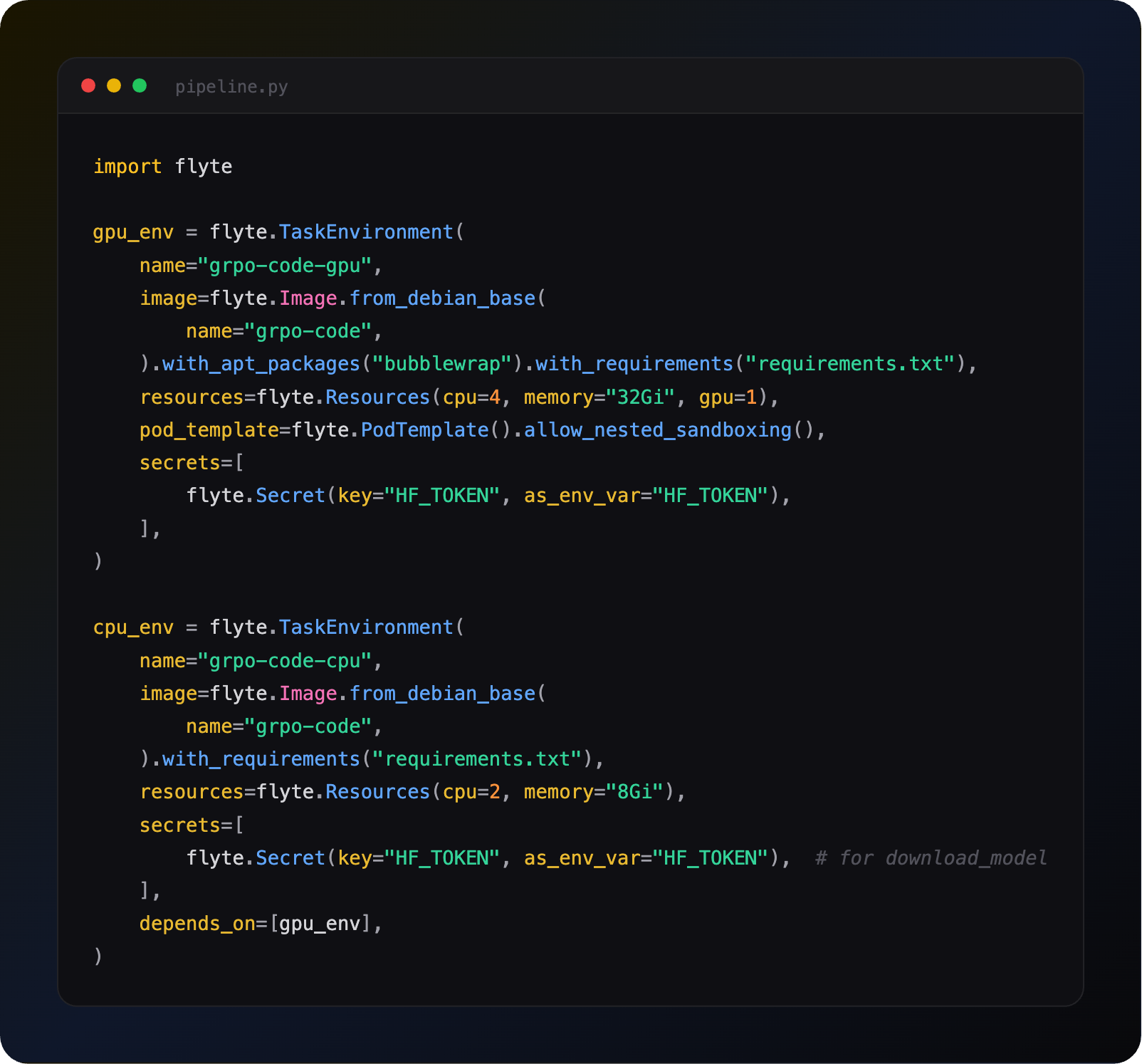
Different resources for different pipeline stages
The real power is giving each task exactly what it needs:
Your download step doesn’t burn GPU hours. Your training step gets the horsepower it needs. You only pay for what you use.
Full resources docs: https://www.union.ai/docs/v2/union/user-guide/task-configuration/resources/
See what’s happening in the Flyte Community:
Latest from the blog
- Run Models, Agents and Apps on Infrastructure You Own - Read on union.ai
- Agents That Survive Production: Rebuilding 21 Design Patterns on Flyte - Read on union.ai
- Introducing Queues and Cluster Controls: Durable Workloads Under Contention - Read on union.ai
- Fine-tune an LLM with LoRA & QLoRA in a Flyte Pipeline - Read on union.ai
Recent talks & recordings
- When the Pipeline Breaks: Building ML Infrastructure for Biotech R&D | Session 1 - Watch on YouTube
- Building Code Mode Agents - Watch on YouTube
- LLM fine-tuning with GRPO - Watch on YouTube
- LLM fine-tuning with LoRA & QLoRA - Watch on YouTube
Upcoming events
- July 28th: Seattle TwelveLabs + Qdrant: AI Systems for Video Embeddings and Search - RSVP on Luma
Releases & updates
- Flyte 2 OSS: Backend Devbox and Reimagined UI - Read on Union
- June’s release brought first-class agents with memory and tool approval, SDK-authored MCP servers, backoff retries and per-attempt timeouts, multi-pod log streaming, and beta queues and events APIs. - Read the Release notes
<div class="button-group is-center"><a class="button" target="_blank" rel="noopener noreferrer" href="https://www.union.ai/docs/v2/flyte/user-guide/run-modes/running-devbox/">Download Devbox</a></div>
From the community
- Open-Source Text-to-Speech: “Natural” Voices - RSVP on Luma
- AI Book Club: Build a Reasoning Model (From Scratch) - RSVP on Luma
That’s all for this week! —Sage Elliott