AI engineering tip of the week: Run Durable AI Workflows on Your Mac's GPU, No Cluster Required
I've demoed Flyte 2 devbox at a lot of events this year, usually running GPU tasks on something like an NVIDIA DGX Spark. The question I got more than any other was some version of "can I do this on my Mac?" At the time, the answer was no, at least not in a way that utilized the M-series GPU accelerator.
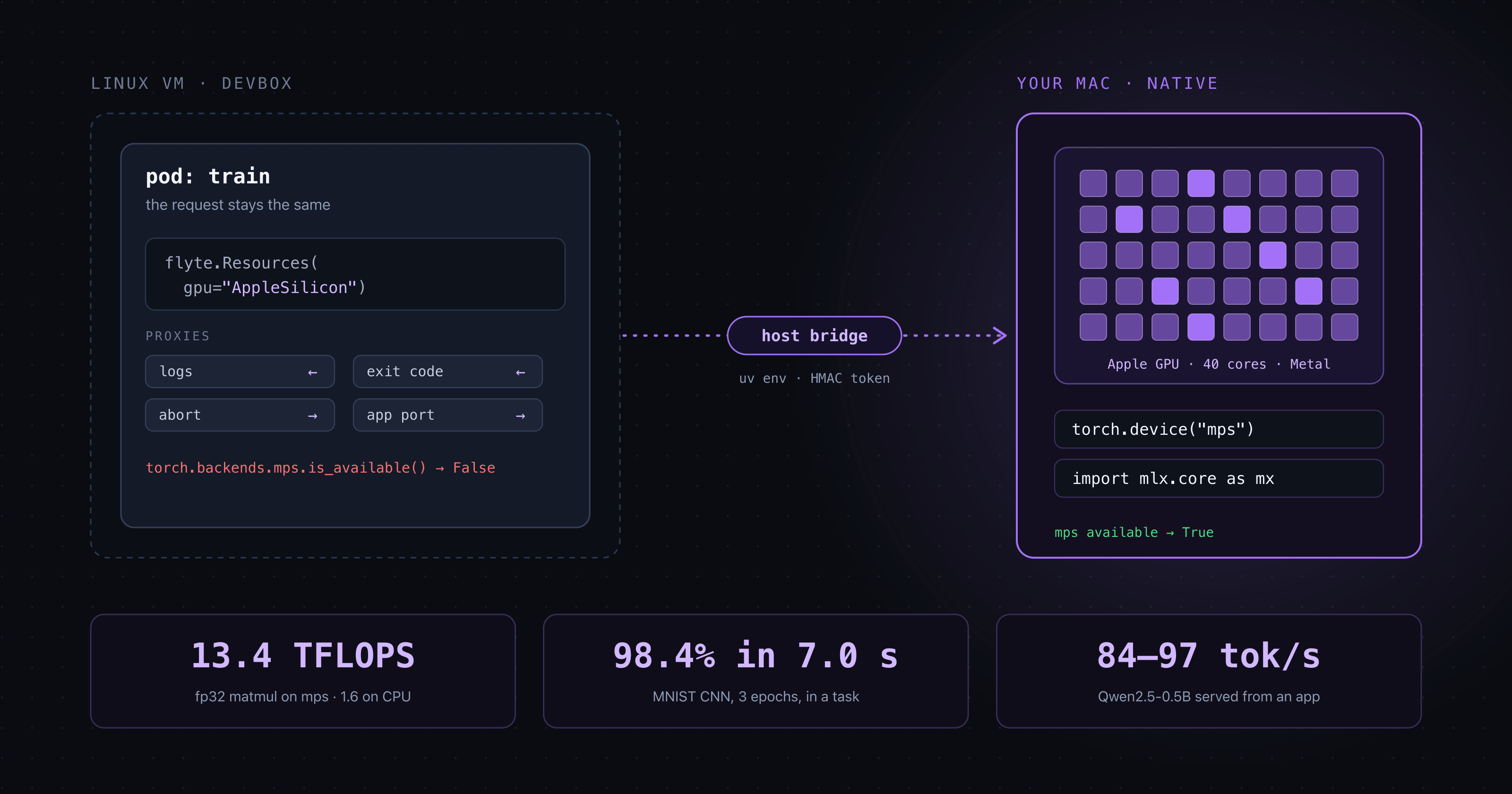
As of Flyte 2.12 the answer is yes! Request `gpu="AppleSilicon"` and the task runs natively on the Mac, with PyTorch's `mps` device and MLX available, while the devbox still owns the run, the inputs, the outputs, and the logs.
Why was it ever no? The devbox runs the whole Flyte control plane in one container on your laptop: the UI, the scheduler, an object store. It's a single node for developing, testing, and personal projects not a cluster that scales, but everything a task does on a real cluster it also does here. The container is a Linux VM, and Linux has no Metal. Your M-series GPU was sitting right there, and a task running inside the devbox could not touch it.
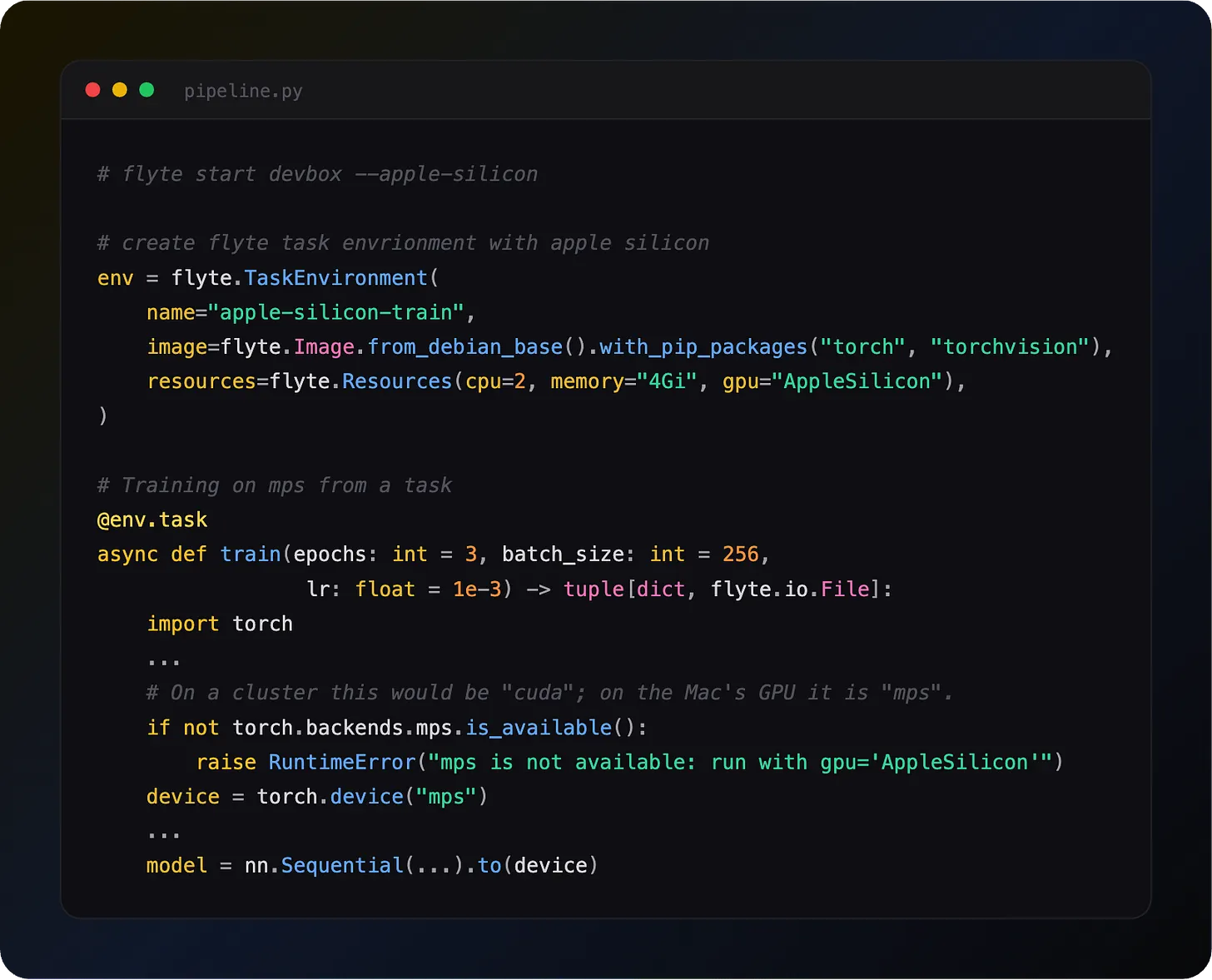
Start the devbox with the apple-silicon flag
This is the Mac counterpart of `--gpu`, which passes NVIDIA GPUs into the devbox on a Linux host. The difference is where the code runs. There is no way to pass Metal into a Linux container, so with `--apple-silicon` the task's code runs on the Mac itself, outside the container. Because of that, the flag binds every devbox port to `127.0.0.1`, so nothing on your network can submit work to your machine. You also need uv installed, since that is what builds the task's environment on the host.
Request the GPU like any other accelerator in Flyte
Same `Resources` object you'd use for `gpu="A100:1"` on a cluster. `"AppleSilicon:1"` and `flyte.APPLE_SILICON()` are accepted too. A count above one is rejected, since the Mac has one GPU.
Train on mps
The task body is ordinary PyTorch. Pick the device, move the model and data to it, train:
Run it the usual way in Flyte:
The first run builds the task image and the Mac-side environment, then downloads MNIST. All of it is cached for the next run. On an M5 Max, three epochs of the CNN took 5.8 seconds and reached 98.9% test accuracy, with epochs two and three at around 44,000 images per second on `mps`. Open Activity Monitor's GPU History while it runs and you'll see the spike.
The weights come back as a `flyte.io.File` in the devbox's object store, exactly as they would from a cluster run.
How it works
The task's container still starts in the devbox, but only as a proxy. It hands the entrypoint to a bridge on the host, which builds a macOS environment with `uv` from the image's pip packages, runs the task natively, and streams the log back. The devbox sees an ordinary task, so retries, caching, and outputs work as usual.
The launch post goes deeper on the design.
Same code, cluster later
The point of doing this in Flyte rather than in a notebook is that nothing changes when the job outgrows the laptop and is ready to be run on a real cluster. In this case the device line already handles it:
Swap the resource request and run against your real cluster:
Same task, same inputs and outputs, same UI. The devbox run and the cluster run sit side by side in your history.
Host Apps and models on your Mac too
`gpu="AppleSilicon"` works on an `AppEnvironment` as well, so you can serve a HuggingFace model from your Mac's GPU with `transformers` on `mps` and hit it at a devbox URL. There is also a new `flyteplugins-omlx` plugin that wraps oMLX, an OpenAI-compatible server built on MLX, as an app environment that defaults to the Apple Silicon GPU. Both are in the SDK's `examples/accelerators` folder.
Why this matters
- Real GPU, real Flyte: Iterate against your laptop’s GPU with the same retries, caching, and lineage a cluster run gets
- Zero rewrite: The same task runs on a cluster by changing the resource request
- No surprises: Fails loudly instead of falling back to CPU
- Your packages: The host environment is built from the same image definition
- Serving as well: Apps and the oMLX plugin run on the Mac’s GPU the same way
Full devbox docs: https://www.union.ai/docs/v2/flyte/user-guide/get-started/run-modes/running-devbox/
See what's happening in the Flyte Community:
Latest from the blog
- Flyte Devbox on the Apple Silicon GPU: model serving and durable training on your Mac - Read on Union
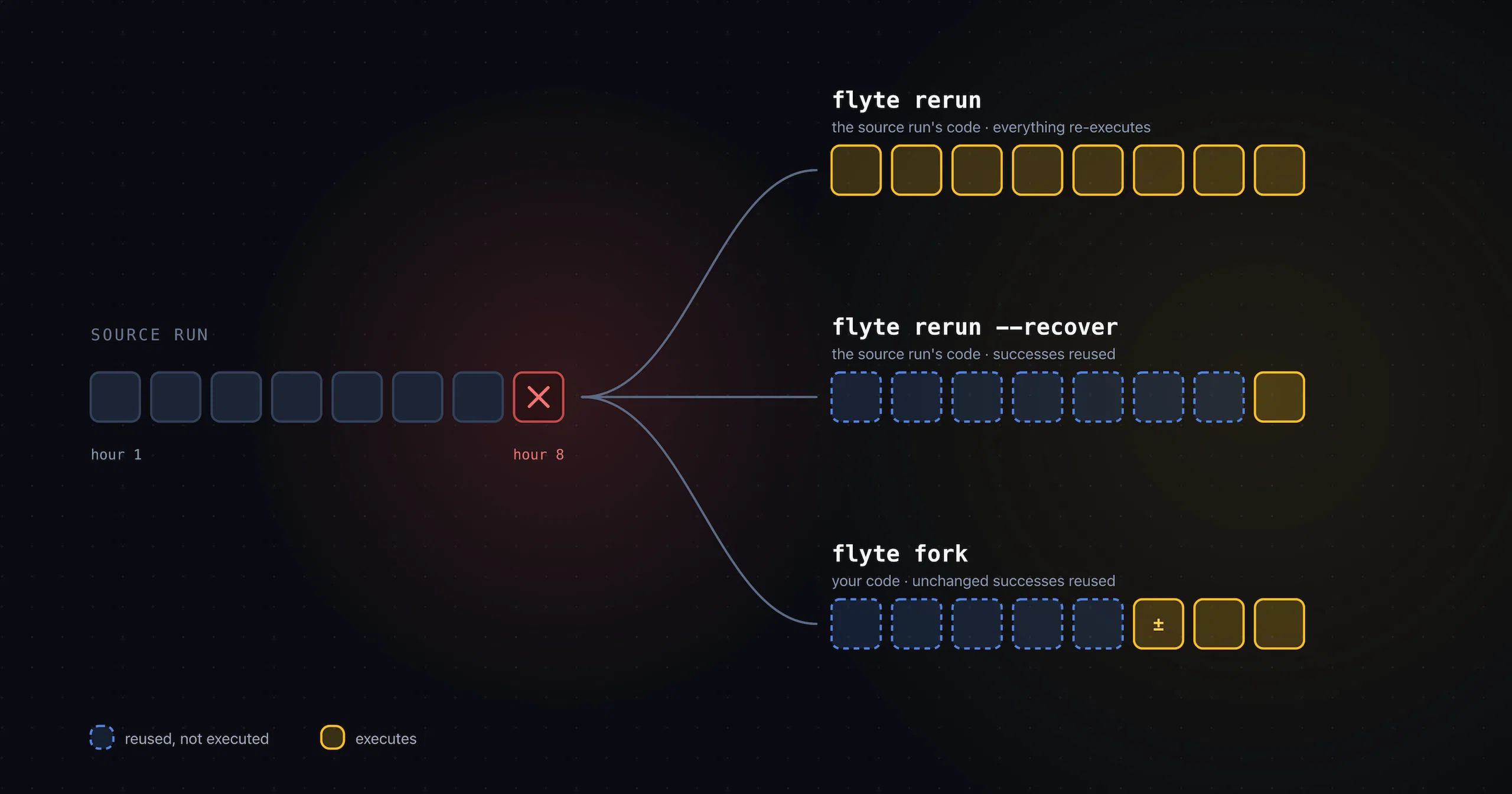
- Rerun, Recover, Fork: Three Verbs for a Run That Already Failed - Read on Union
- Inside Union: Resource-Aware Scheduling for Flyte 2.0 - Read on Union
- It’s now super easy to start using Union.ai - Read on Union
- Union.ai Launches Self-Service Access on AWS Marketplace to Enable Sovereign AI - Read on Union
- Pandera 0.33: a CLI for validation without writing Python, and native PyArrow table support - Read on Union
Recent talks & recordings
- Union: AI Infrastructure Made Easier - Watch on YouTube
- Flyte 2: The Durable Runtime Built for AI - Watch on YouTube
- When the Pipeline Breaks: Building ML Infrastructure for Biotech R&D | Session 1 - Watch on YouTube
- LLM fine-tuning with GRPO - Watch on YouTube
Upcoming events
- [Seattle] Build Your First Model Factory - Hacknight Seattle | Oct 22nd - RSVP on Luma
- Flyte 2 + Apple Silicon for durable local AI workflows | Oct 28 - RSVP on Luma
- [SF] Own Your AI: Build Your First Model Factory - Hack Night SF | Nov 3 - RSVP on Luma
Releases & updates
- Flyte 2 Is Generally Available: The Durable, Open-Source AI Runtime - Read on Union.ai
<div class="button-group is-center"><a class="button" href="https://www.union.ai/docs/v2/flyte/user-guide/run-modes/running-devbox/">Download Devbox</a></div>
From the community
- AI Book Club: Grokking Deep Reinforcement Learning - RSVP on Luma
That's all for this week! - Sage Elliott