A devbox task or app that asks for `gpu="AppleSilicon"` now runs natively on your Mac, so `torch.device("mps")` and MLX work the way `"cuda"` does on a cluster.
The Flyte devbox is where I iterate on ML code before it goes anywhere near a cluster: `flyte start devbox`, write a task, run it, look at it in the console. On an Apple Silicon Mac there's been one glaring gap. The devbox runs every task and app in a container, and on a Mac that container is a Linux VM. Linux has no Metal, so `torch.backends.mps.is_available()` is `False` in there, MLX doesn't run at all, and the 40-core GPU on my laptop sits idle while my training loop crawls along on the CPU.
So we added an Apple Silicon accelerator to the devbox. You ask for it the way you'd ask for an A100:
and start the devbox with one flag:
That's the whole API. `gpu=flyte.APPLE_SILICON()` is the same request if you prefer the device helpers (`flyte.GPU`, `flyte.TPU`, `flyte.AMD_GPU`).
What actually runs where
The obvious design is to pass the GPU through to the container. That isn't possible: there's no Metal inside a Linux VM to pass anything to. An earlier version of this work kept the task in its container and gave it a host-side MLX model server to call over HTTP. That's useful if all you want is completions, but it means your code can't touch the GPU itself. You can't move a PyTorch model to `mps`, you can't train, and you can't load an arbitrary Hugging Face model.
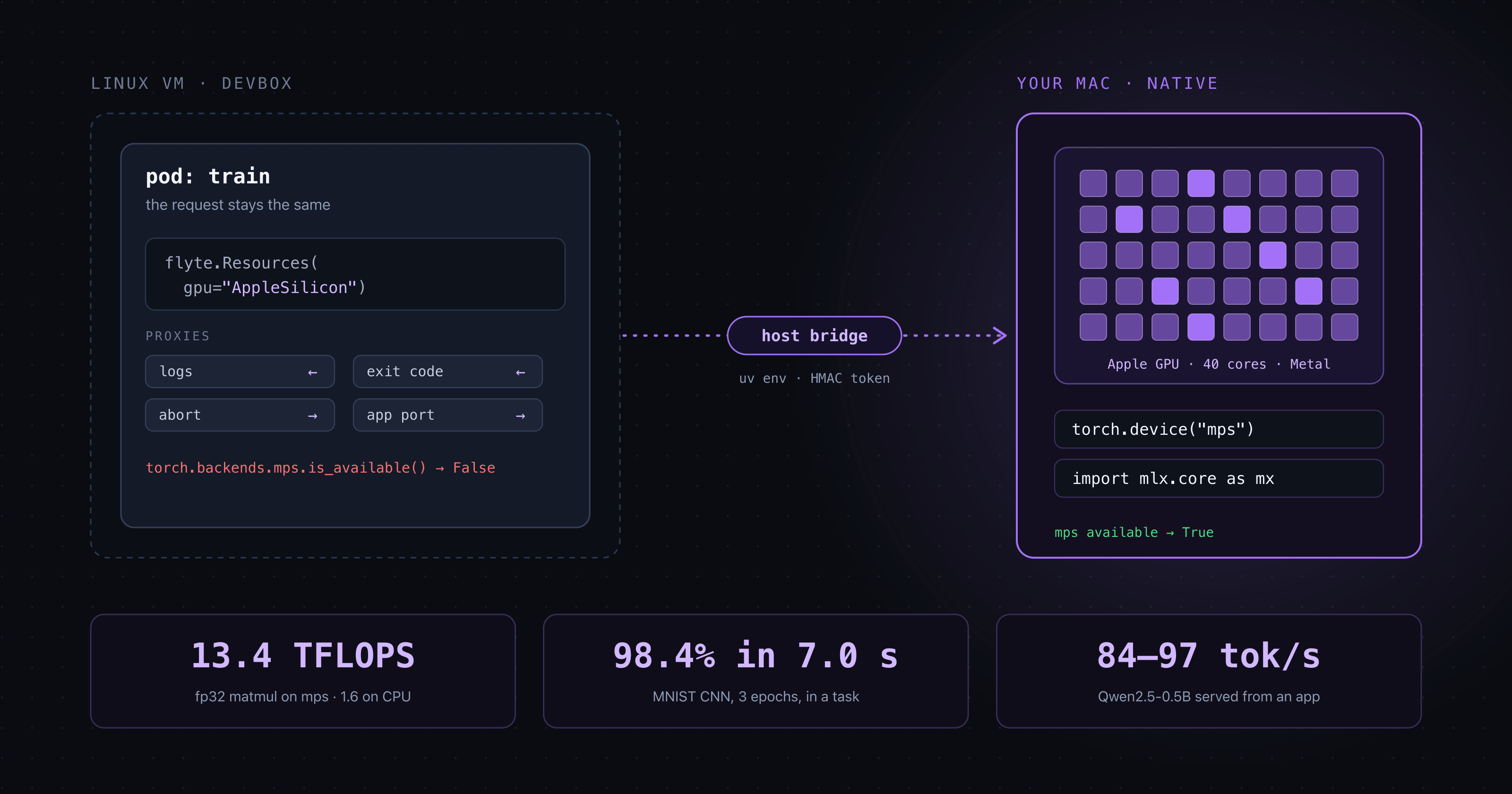
So the default is the other way around. The workload's code runs natively on the Mac, and the container becomes its proxy:
- The container starts as usual. Its Flyte entrypoint (`a0` for tasks, `fserve` for apps) sees that the backend scheduled it as an Apple Silicon workload and hands its own invocation to a bridge that `flyte start devbox --apple-silicon` runs on the host.
- The bridge builds a cached `uv` environment for macOS from the image's pip packages, rewrites the in-cluster endpoints to the devbox ports the Mac can reach, and runs the same entrypoint there.
- The container streams the host process's log, mirrors its exit code, forwards aborts, and for apps forwards its port, so the console, the run's logs and the app URL behave as they would for any other workload.
From the console's perspective, a task ran in a pod and produced outputs. From the Mac's perspective, a Python process ran in `~/.flyte/apple-silicon/envs/...` with the GPU right there.
On the backend side, a pod that requests the `APPLE_SILICON` device class gets no GPU resource request (no device plugin could satisfy it, so it would sit `Pending` forever) and no GPU node affinity. Instead it gets the bridge's endpoint and a per-workload HMAC token, so one workload can't talk to another's process.
Training on mps from a task
Once the code is on the Mac, the training loop is ordinary PyTorch. The only Apple-specific line is the device:
The example trains a small CNN on MNIST and returns its metrics and weights as a `flyte.io.File`. On my M5 Max, three epochs took 7.0 s at roughly 24–28k images/s and reached 98.4% test accuracy, and the weights landed in the devbox's object store like any other output. The task's own `print` lines show up in the run's logs in the console, streamed from the process on the Mac.
The first run takes a few minutes because the bridge has to build the macOS environment (torch, torchvision) and download MNIST. Later runs reuse both.
Serving a Hugging Face model from an AppEnvironment
Apps work the same way. `apple_silicon_serve.py` is an `AppEnvironment` that loads `Qwen/Qwen2.5-0.5B-Instruct` in fp16 straight onto `mps` at startup:
There's no model server in between. The app is your code, holding your model on the GPU, behind the usual devbox app URL. On the same machine it generated at roughly 84–97 tokens/s. The weights download into the Mac's normal Hugging Face cache, so the second start is quick.
Proving it's the GPU
"It feels faster" isn't evidence, so the SDK ships a proof task (`examples/accelerators/apple_silicon_proof/`) that fails unless five checks pass. Because the code runs on the Mac, it can gather the evidence itself:
- Where it ran: `platform` reports `Darwin arm64`, not the container's Linux.
- What GPU: MLX reports an Apple M5 Max (`applegpu_g17s`), 40 GPU cores.
- PyTorch on mps: a 4096×4096 fp32 matmul ran at 13.4 TFLOPS on `mps` vs 1.6 on the CPU.
- MLX on the GPU: 36.5 TFLOPS on the GPU device vs 1.6 on the CPU.
- What macOS saw: the IORegistry's `Device Utilization %` (the counter Activity Monitor's GPU History draws) averaged 93.5–94.7% during the GPU work vs 30% at idle.
The same checks run as an app, behind `GET /proof`. The runbook next to it also covers checks that don't trust our code at all: watching Activity Monitor, reading the IORegistry counter in a loop, and finding the `a0` process with `ps`.
The tradeoffs
Running workload code natively on your Mac means running it outside any sandbox. That's the price of real GPU access, and it's why `--apple-silicon` is opt-in. When you pass it, the devbox publishes every port on `127.0.0.1` only, so nothing else on your network can submit a workload that ends up running on your laptop. If you resume a paused Apple Silicon devbox, its bridge comes back without the flag; if the existing devbox was published on every interface, it refuses and tells you to recreate it. That keeps the network out, not software already on your Mac: the devbox API is unauthenticated, as any local dev server's tends to be, so treat an Apple Silicon devbox like one that can run code (because it can).
The rest of the sharp edges:
- No silent CPU fallback. Ask for `gpu="AppleSilicon"` on a devbox without the flag, an Intel Mac, Linux, or any real cluster, and the task fails before it starts with `APPLE_SILICON_NOT_AVAILABLE` and a message naming why. This is deliberate. A training job that quietly runs on the CPU is worse than one that fails.
- Only pip packages carry over. The Mac's environment is built from the image's pip packages, not the image itself, so apt packages and anything else baked into the image aren't there, and neither are k8s-mounted secrets.
- It's the devbox, not a cluster. The accelerator is never cluster-schedulable, and a single workload can't claim more than the Mac's one GPU (`AppleSilicon:2` is rejected).
- Several at once share one GPU. Each Apple Silicon workload is its own process on the Mac, so a fan-out works: `examples/accelerators/apple_silicon_fanout.py` ran eight training shards concurrently. They time-share the GPU, though. A job that already keeps the GPU busy gained little (1.0–1.35x aggregate throughput at 2–8 shards), while a small-batch job that left it idle much of the time gained 1.3–2x. Memory is the real ceiling: every process loads its own torch, Metal context and model.
- "mps" on the devbox, "cuda" on a cluster. The program doesn't move between them unchanged: you change the resource request and the device string. Everything around them stays the same: inputs, outputs, caching, logs and app URLs all go through the devbox exactly as they do on a cluster.
If you'd rather keep the container's isolation and only need completions, set `env_vars={"FLYTE_APPLE_SILICON_EXECUTION": "container"}`. The workload stays in its container and gets a host `mlx_lm.server` behind an injected `OPENAI_BASE_URL` (choose the model with `FLYTE_APPLE_SILICON_MODEL`; `pip install 'flyte[apple-silicon]'` installs mlx-lm).
Conclusion
The local tier of the "same program, laptop to cluster" loop finally includes the GPU most of us are actually carrying around. To recap:
- Ask for it: `flyte.Resources(gpu="AppleSilicon")` or `gpu=flyte.APPLE_SILICON()`.
- Allow it: `flyte start devbox --apple-silicon`, which also binds the devbox to `127.0.0.1`.
- Use it: `torch.device("mps")`, MLX, or your own Hugging Face model, from a task or an app.
- Trust it: a named error instead of a CPU fallback, and a proof task that checks the GPU did the work.
Try it
You need an Apple Silicon Mac (M1 or later), Docker, and uv on the host, since the bridge uses it to build each workload's environment.