AI engineering tip of the week: Flyte MCP server: let Claude Code run, debug, and fix your pipelines
You're probably already building with a coding agent, and it's probably already doing a decent job writing Flyte code. Claude Code, Codex, and the rest have seen enough of Flyte to produce a task that runs. The Flyte 2 sdk has slightly different syntax than Flyte 1 so occasionally you get old habits, guessed imports, and a loop where it writes the task, you run it, it fails, you paste the logs back, and it tries again.
Flyte now ships two official pieces that fixes that problem. A set of skills that teach the agent how Flyte 2 actually works, so it writes Flyte workflows with `@env.task` the way the SDK expects. And an MCP server that gives it a structured way to run tasks, wait on them, and read their logs, so it closes the loop itself instead of through you.
If you're new here, the reason people build on Flyte is that it's a durable AI runtime. Training, data, serving, and agents all run as plain Python tasks, every step is checkpointed and cached, and a failed run picks up where it stopped instead of starting over. The same code runs on your laptop's devbox and on a cluster. Skills plus the MCP server mean your coding agent gets all of that right the first time, and you get to stop being the copy-paste layer.
Install the skills
Skills are plain `SKILL.md` files. One command installs all 23 into whichever harnesses it finds on your machine:
Claude Code, Codex CLI, Hermes, OpenCode, and Pi are all supported, and you can pick one with `--target claude`. The skills cover authoring (tasks, types, images, apps, agents, data, ML), migrating from Flyte 1 or from Slurm, and deploying a cluster. With `flyte-sdk-author` loaded, the agent stops guessing at a Flyte 1 style `@workflow` and writes `@env.task` the way the SDK expects. The skills and both MCP servers live in the open at github.com/flyteorg/flyte-agent-plugins, so an agent that goes looking for Flyte skills finds the official ones.
Add the MCP servers
Two servers, split so nothing is duplicated:
`flyte-docs` is a hosted, read-only search over the SDK examples and the docs. `flyte-cluster` runs on your machine, uses your existing `flyte` login, and exposes the control plane: list tasks, run one, wait for it, read its logs, inspect a failed action, answer a waiting approval. The installer drives `claude mcp add` for you, so your config stays in the harness's own format.
Prefer to wire it yourself? It is one line:
`--transport stdio` appears twice on purpose. The first tells Claude Code how to talk to the server, the second tells the server which transport to speak.
What the agent can now do
Ask Claude Code to "run the training task with 3 epochs and tell me if it passes." It calls `run_task`, then `wait_for_run`, then `get_logs` on the failing action, reads the traceback, edits your code, and runs it again. You watch the run in the Flyte UI instead of relaying it.
`run_task` launches tasks by name, so they have to be deployed first. One `flyte deploy --all pipeline.py` registers every task in the file, and from then on the agent can run them by name and version.
The tool list is the full lifecycle: tasks, runs, actions, logs, apps, triggers, projects, secrets (names only, never values), conditions, and identity. The `search` group grounds answers in the real SDK examples instead of the model's memory.
Scope it before you share it
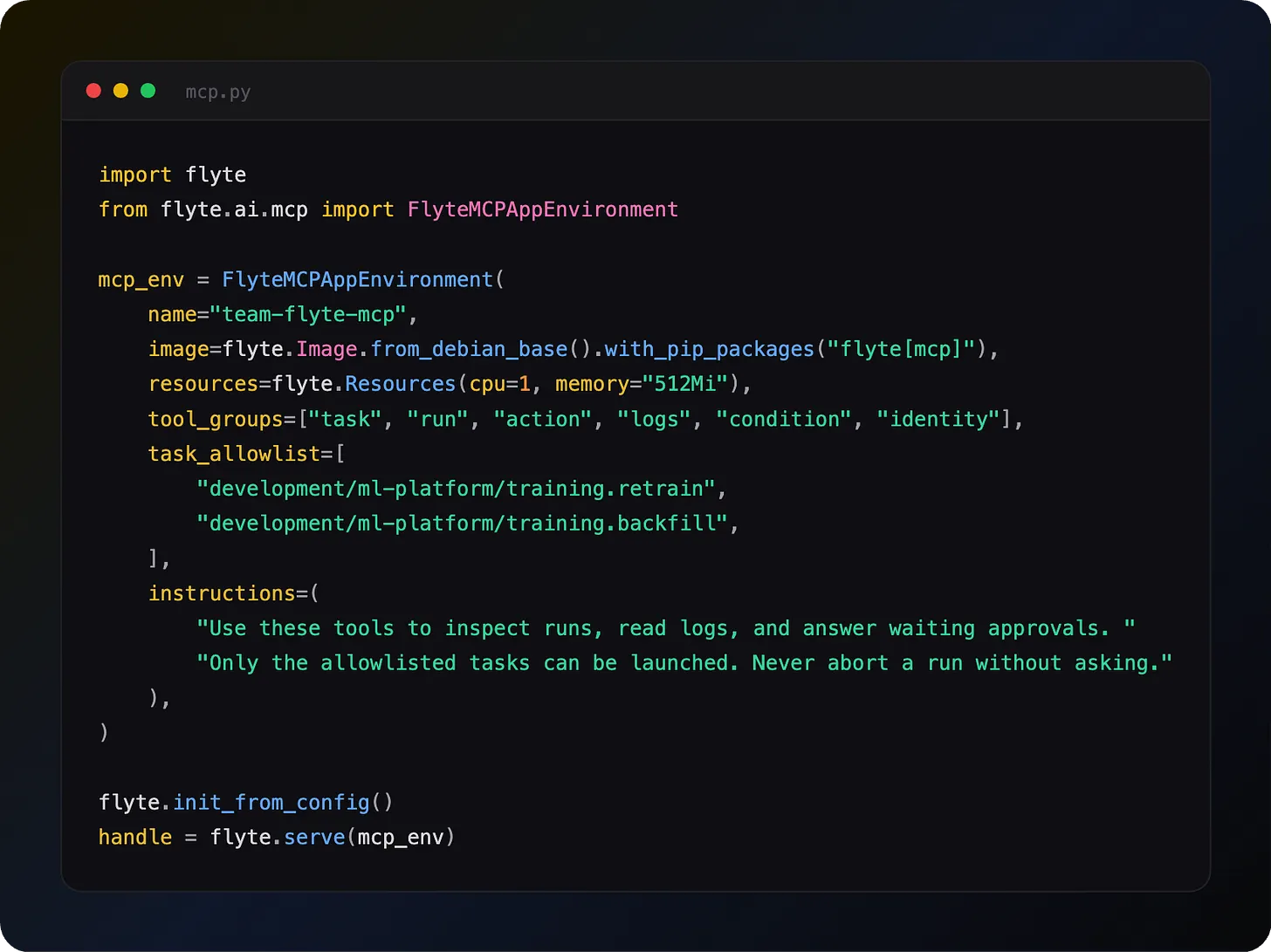
A server with every tool and no restrictions is fine for your laptop. For a team, you may want to narrow it. You can pass `--tool-groups`, `--tools`, or `--read-only` to the CLI, or deploy a `FlyteMCPAppEnvironment` with allowlists so nobody has to install anything:
Give the app an image with the `flyte[mcp]` extra installed, since the server needs the MCP, Starlette, and Uvicorn packages at runtime.
Three layers of control, coarse to fine. `tool_groups` picks which families of tools exist. `tools` names individual ones, or `read_only=True` keeps only the tools that never change anything. Allowlists restrict which tasks, apps, or triggers a tool may touch, so `run_task` can exist without being able to run anything else. Ask it to run a task outside the list and the agent gets back "is not allowlisted" as an ordinary tool error. The `instructions` string is sent to the model, and a specific one measurably improves tool selection.
The deployed app sits behind your organization's auth with `requires_auth=True`, so each call runs as the person driving the agent. Point Claude Code at it:
Remote deployment needs Union apps. On open-source Flyte, use the local stdio mode, which supports every scoping option except allowlists.
Serve your own tools the same way
The same `MCPAppEnvironment` base class deploys any FastMCP instance. Database lookups, internal APIs, retrieval over your own corpus: register them with `@mcp.tool()`, deploy with `flyte.serve()`, and Claude Desktop or Claude Code can call them over an authenticated URL. Same image, secrets, and scaling story as every other app.
Why this matters
- Close the loop: The agent runs the task, reads the failure, and fixes it without you relaying logs
- Grounded answers: Skills and the docs server teach it Flyte 2, not Flyte 1 from memory
- Your login, your machine: `flyte-cluster` talks straight to your control plane
- Scope it: Tool groups, individual tools, and allowlists for anything shared
- Any harness: Claude Code, Codex, Hermes, OpenCode, Pi
Full docs: https://www.union.ai/docs/v2/flyte/api-reference/agent-plugins/ and https://www.union.ai/docs/v2/flyte/user-guide/agents/build-mcp/flyte_mcp_server/
See what's happening in the Flyte Community:
Latest from the blog
- Your nf-core pipelines, now on Union - Read on Unoin
- Union self-serve on Google Cloud: run your sovereign AI factory inside your own project - Read on Unoin
- Union Artifacts part 1: naming the things your tasks produce - Read on Union
- Flyte Devbox on the Apple Silicon GPU: model serving and durable training on your Mac - Read on Union
- Rerun, Recover, Fork: Three Verbs for a Run That Already Failed - Read on Union
- Union.ai Launches Self-Service Access on AWS Marketplace to Enable Sovereign AI - Read on Union
Recent talks & recordings
- Flyte + Apple Silicon for durable local AI workflows: Your Mac Is Now an AI Devbox - Watch on YouTube
- Union: AI Infrastructure Made Easier - Watch on YouTube
- Flyte 2: The Durable Runtime Built for AI - Watch on YouTube
- When the Pipeline Breaks: Building ML Infrastructure for Biotech R&D | Session 1 - Watch on YouTube
- LLM fine-tuning with GRPO - Watch on YouTube
Upcoming events
- Own Your AI: Build an Agentic AI Model Factory | Dec 9 - RSVP on Luma
- Build a Better AI Homelab with Flyte | Dec 16 - RSVP on Luma
Releases & updates
- Flyte 2 Is Generally Available: The Durable, Open-Source AI Runtime - Read on Union.ai
From the community
- AI Book Club: Reinforcement Learning from Human Feedback (RLHF) - RSVP on Luma
That's all for this week! - Sage Elliott