An RPA bot follows steps someone decided in advance, and every new job means building another bot. An agent is given a goal, decides each step while it runs, and takes on a new job with a new prompt. We rebuilt a real RPA workflow as an agent on Flyte 2, broke it on purpose, and recorded every decision it made.
Why RPA is dead
We gave an agent an RPA job and broke it on purpose by redesigning the supplier's portal overnight. It finished anyway.
RPA made sense before AI could read a screen. An RPA bot follows a process someone fixed in advance. That works until it doesn't: when a supplier renames a button, a pop-up appears, or an API starts refusing a call, the bot fails.
An agent works more like a person. Give it a goal, and it changes its plan as it runs. A new job is just a new prompt. So you get everything a bot could do, without its two biggest pain points: fixing bots when the world changes, and building new ones when the work does.
Don't believe us? See it in action.
Watch an agent do a bot's job
The job
The job is a typical distributor workflow. Every morning, purchasing brings the ERP's prices in line with the supplier's latest price list:
The supplier portal and the "Acme ERP" desktop client are stand-ins we built for the demo. They run on a Windows Server 2025 VM, the kind of machine RPA bots already run on. The workflow runs in Union on a cron trigger at 06:00 Central.
The twist: overnight, the supplier redesigned its portal. The export button moved into a Reports menu under a new label, and a cookie banner now covers the page. A recorded-click bot fails at this point. (For the demo we switch the redesign on deliberately, with a `chaos` flag.)
What the agent did
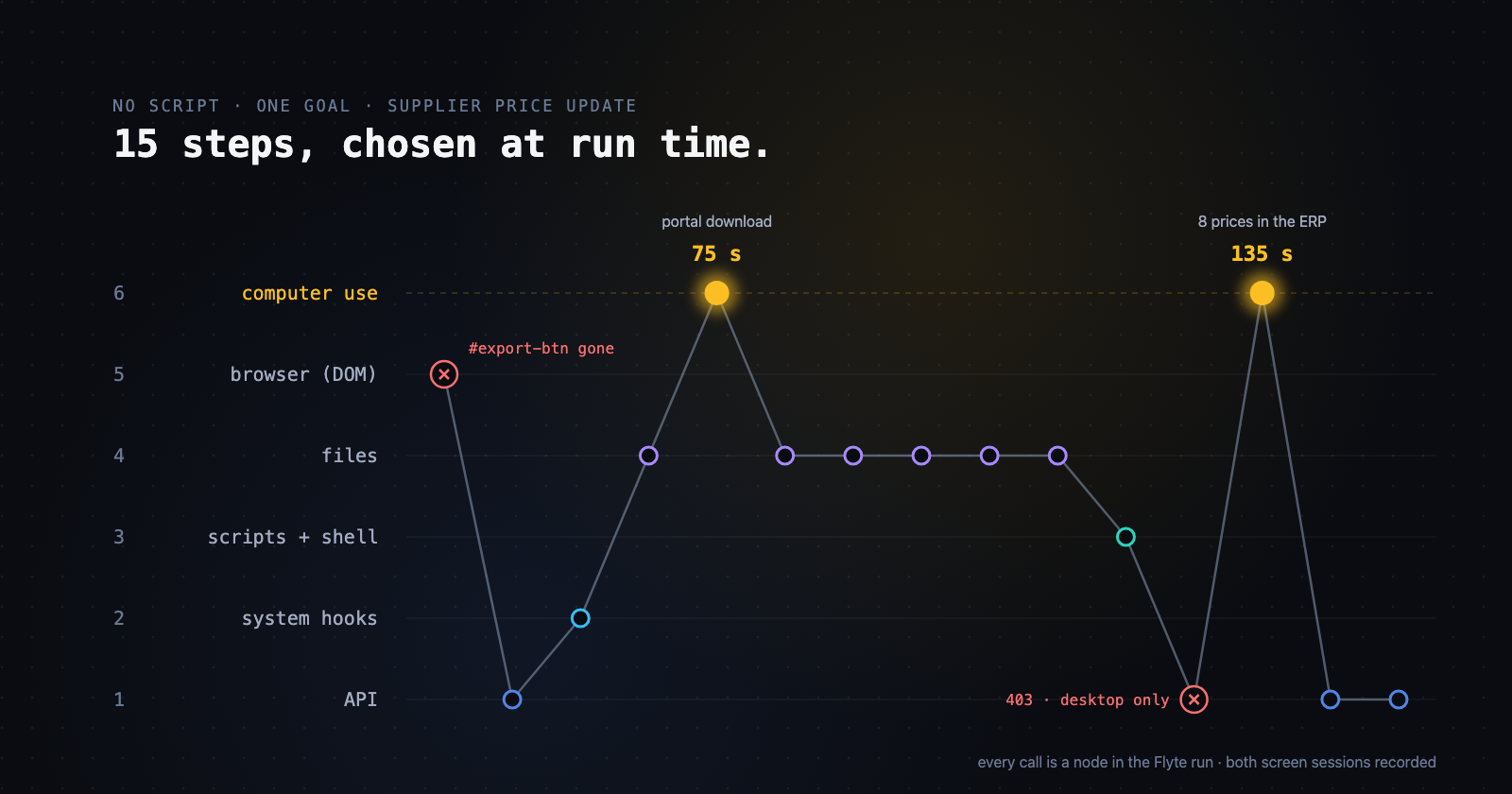
The agent got one sentence, "Run the daily supplier price update for 2026-11-06", plus its standing instructions. Everything below is what it chose to do. Times are measured from the start of the run:
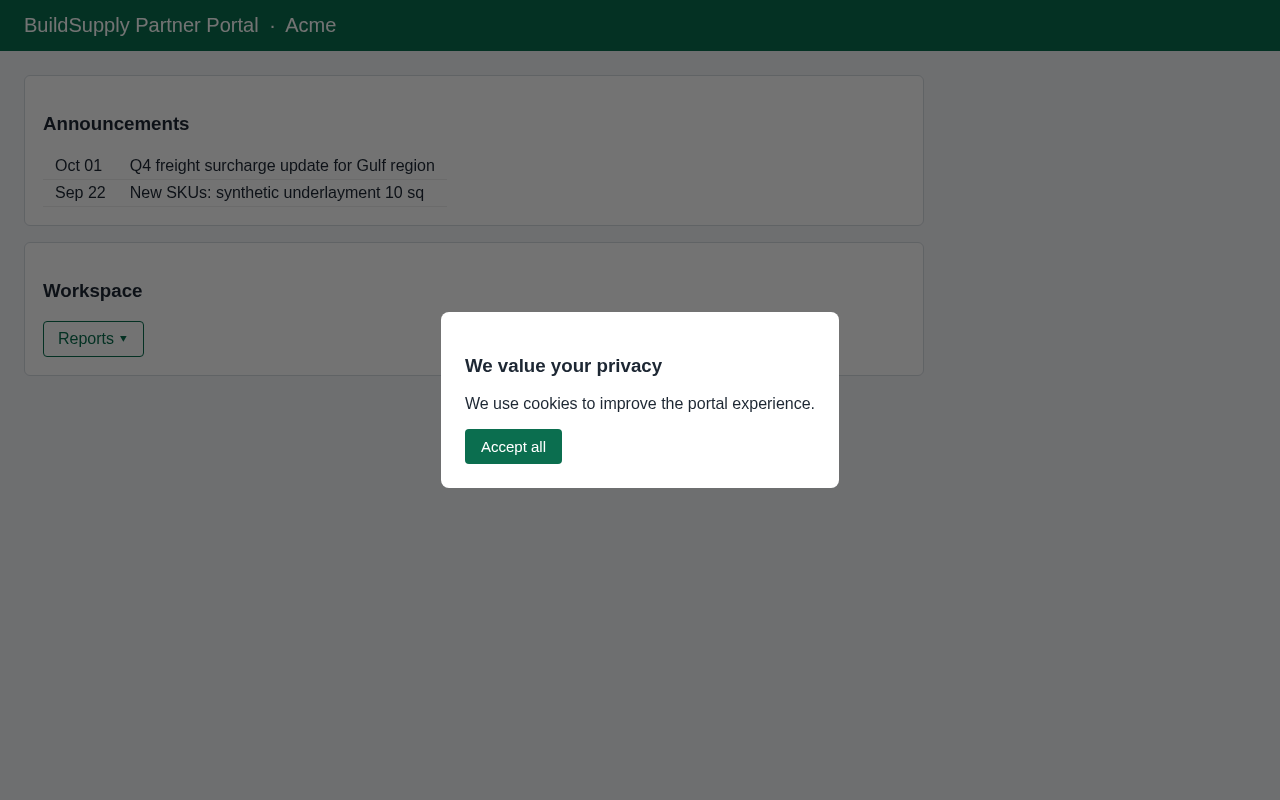
That screenshot is what the Playwright step saw when it timed out, attached to the failed node in the run. This is where an RPA bot stops. Here is what the agent did with the same page a minute later:
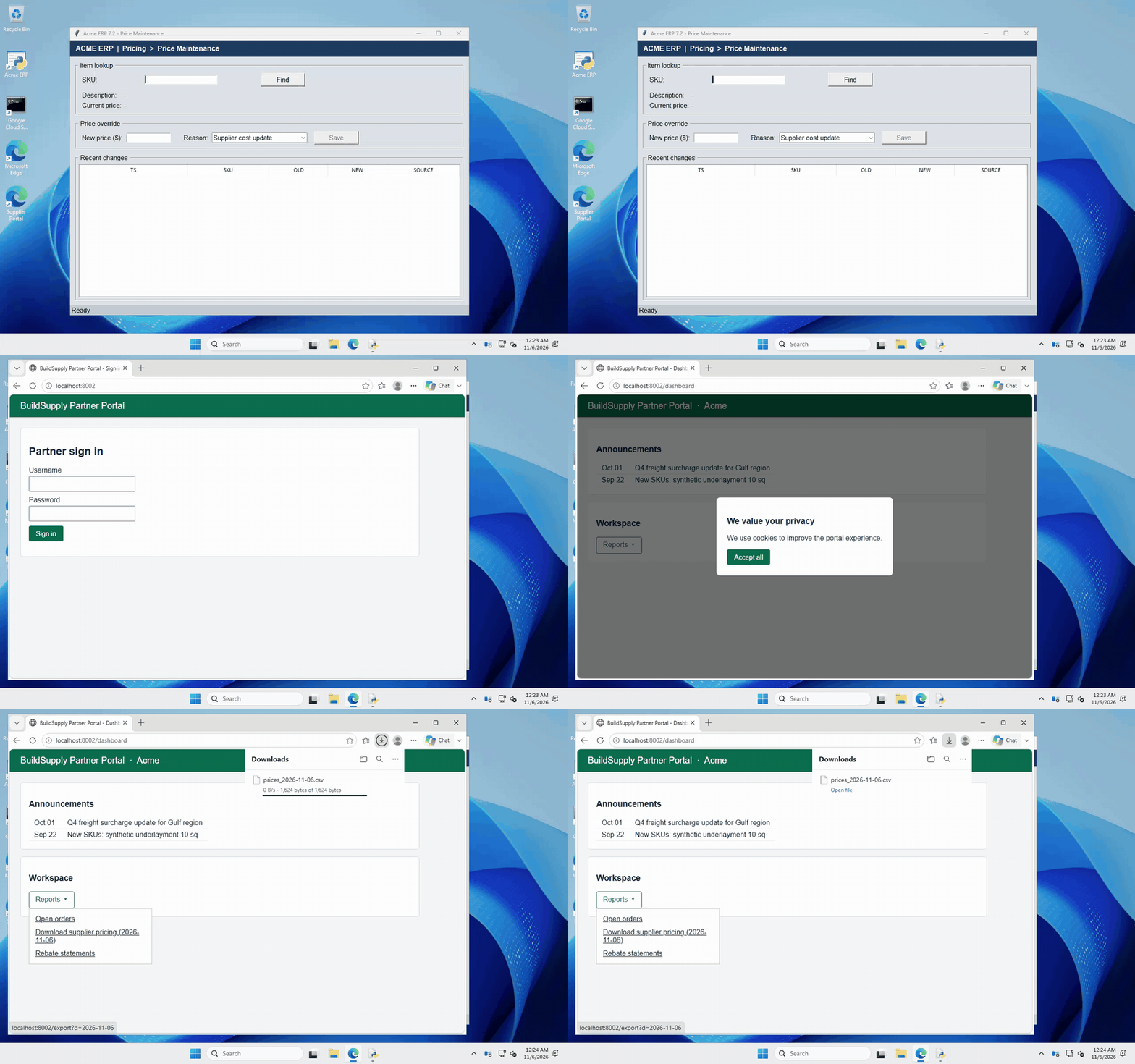
Three moments in the run are branches nobody wrote. An RPA bot would have needed each one predicted, coded and tested in advance.
The redesign. Nobody told the agent the portal had changed. It read the Playwright error, decided the page no longer matched the script, and handed that one step to computer use with a precise goal. As soon as the file was downloaded, it went back to file tools to collect it, rather than asking the screen to confirm.
The policy refusal. The API's 403 explained that price overrides only go through the desktop client. The agent didn't retry the other seven SKUs against the API. It read the refusal as a rule about the whole batch and moved all eight to the desktop in a single session.
The session timeout. Partway through entering prices, the ERP showed a session-timeout pop-up while the agent was moving from one SKU to the next. When the agent dismissed it, the SKU it had typed hadn't loaded, and the price field still held the previous SKU's price. It noticed, reloaded the SKU, and checked that nothing wrong had been saved. For every remaining SKU, it confirmed the item had loaded before pressing Save. The ERP's audit log shows exactly one entry per SKU.
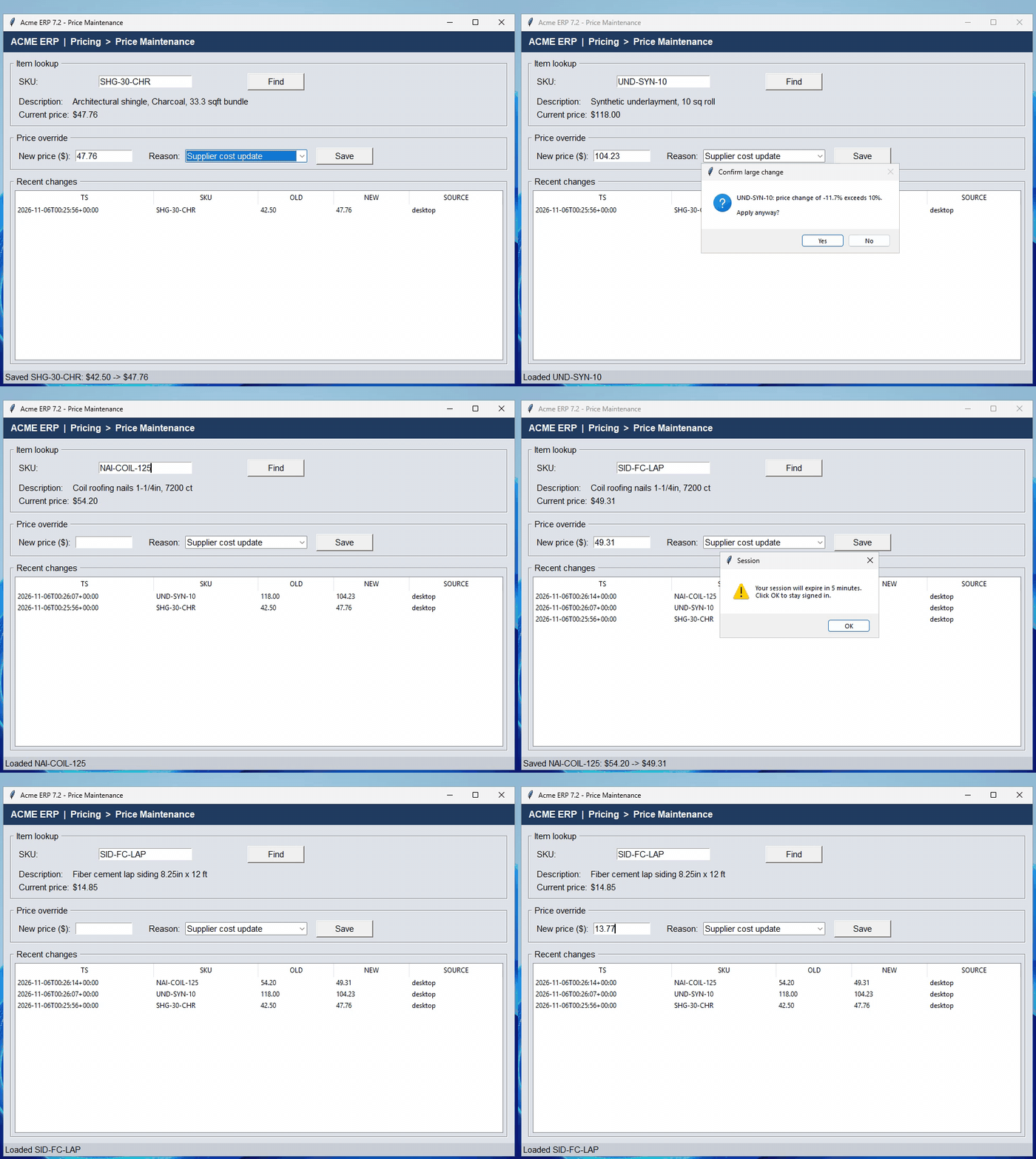
When it finished, the agent reported what a person might want to know: three prices moved more than 10%, so a buyer may want to check them, and the old scripted download no longer works on the new portal. Nobody has to fix that before tomorrow.
The same agent, the next job
The second cost of RPA, a new bot for every new job, goes away for the same reason. Here is the entire task-specific part of the agent's instructions:
Five lines, written the way you'd brief a new hire.
Most of the tools are reusable too. About 10 of the agent's 15 tools work on a system, not on this job: run a command on the VM, read or write a file, restart a service, look up SKUs in the ERP, operate the desktop, ask a person to approve. Any job on these systems can use them. Only a few are specific to price updates, like the one that builds the change workbook.
So the cost model changes. You build tools once per system: the ERP, the portal, the VM. Every task reuses them. A new job is a new prompt, plus the occasional new tool:
With RPA, that reconciliation job is another bot: another recording, another set of selectors, another thing that breaks when the portal changes. With an agent, it's another sentence, and one that anyone in purchasing could write. Developers own the tools and the guardrails, like the approval gate below; the people who own the process write the jobs.
Want to do it too? The demo, explained
The full example is in the agentic RPA tutorial in our workshops repo. It runs on your own machine against a Linux desktop in Docker, with the same toy portal and ERP and the same tools: start the Docker desktop, run the agent with `--chaos`, and watch it work around the redesign. The rest of this section walks through how it's built on Flyte 2.
Every tool is a task
Each capability is an ordinary async Python function decorated with `@env.task`. Here are the ERP API tool and the Playwright download. The download is the old bot, wrapped as a tool; that's how existing bots carry over:
@env.task
async def erp_set_price_via_api(sku: str, new_price: float) -> dict:
"""Try to update a SKU's price through the ERP REST API. Returns the API's answer, including refusals."""
async with _erp() as c:
r = await c.post(f"/skus/{sku}/price", json={"price": new_price})
return {"ok": r.is_success, "status": r.status_code, "detail": r.json().get("detail", r.text)}
@browser_env.task(report=True)
async def portal_download_prices(run_date: str = "") -> File:
"""Log into the supplier portal with Playwright and export today's price list CSV.
Fails with the selector that broke if the portal's layout has changed."""
...
except PwTimeout as e:
shot = base64.b64encode(await page.screenshot()).decode()
flyte.report.get_tab("Browser").log(f"Failed at: {html.escape(step)}
...  ")
await flyte.report.flush.aio()
raise RuntimeError(
f"Portal automation failed at step '{step}': the page no longer matches the script "
f"(likely a portal redesign). Playwright: {str(e).splitlines()[0]}"
) from None
Two design choices matter here, because an agent decides from what its tools tell it. `erp_set_price_via_api` returns the refusal instead of raising, so the agent can read the reason. `portal_download_prices` raises an error written for a reader, either a person or a model, that names the step that broke and attaches a screenshot of the page to the run's report.
Each family of tools runs in its own container. The browser tools get an image with Chromium in it, the computer-use loop gets its own long-lived environment, and the orchestrator and the API, shell and file tools share a light image of about 1 GiB. Nothing pulls a browser into a pod that only makes REST calls.
The agent prefers the cheap tools
Operating a screen is the slowest and most expensive thing the agent can do, so its instructions rank the tools by cost and reliability, and tell it to use the lowest one that can do the step:
There's no routing code. The ranking and the rules for moving between tools are a few lines of the instructions:
In this run, only 2 of the 15 calls used the screen. They took 3.5 minutes; the other 13 calls took 2.1 minutes combined.
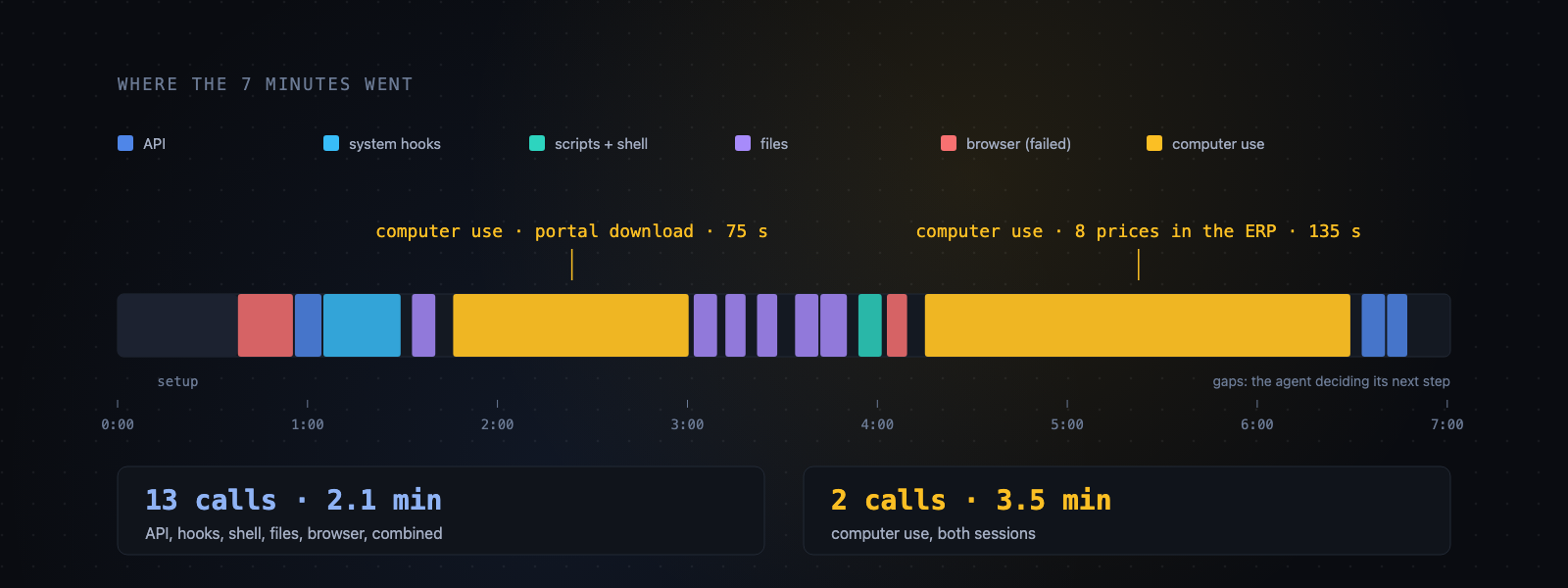
The agent isn't a model clicking through a desktop all day; it's a model choosing between an API call and a click, and choosing the API whenever it can. If it uses the screen for the same step every day, you can add an API or a script for that step, and the agent starts using it, with no change to the prompt.
The agent and its schedule
The agent itself is a few lines with `flyte.ai.agents.Agent`, and a cron trigger starts it every morning:
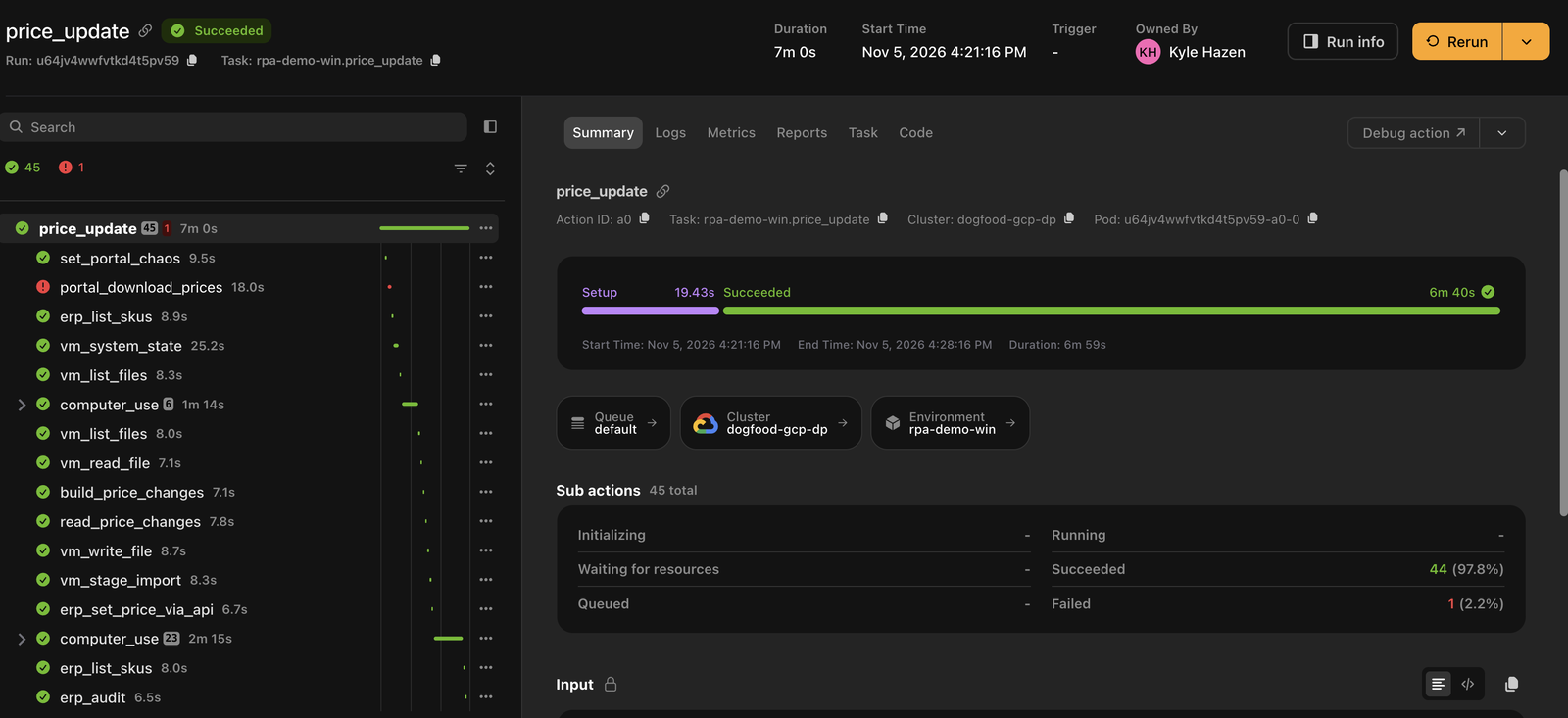
Nothing about the graph is declared in advance. Flyte 2 tasks are plain async Python, so every tool call the agent makes becomes a child action as it happens. The run graph is the record of what the agent decided, including the failed Playwright attempt and the API's 403.
Computer use is a task, and it records the screen
Operating the desktop is one task with a narrow interface: a goal goes in, and a result plus a recording come out.
The loop inside it uses Claude's computer-use toolset, and the actions are carried out on the VM by a small computer server. Each model turn's batch of clicks and keystrokes is wrapped in a `flyte.trace` call, so every turn is its own node, with its inputs and outputs:
That gives two layers of evidence. The "Computer use" report tab streams a timeline as the session runs, showing for each step a screenshot, the model's reasoning, and the actions it took. The full recording is an mp4 attached to the task as a `flyte.io.File` output, so it sits in lineage next to the goal that produced it. The recorder stops in a `finally` block, so a failed session keeps its recording. A failed session is exactly when you want the recording.
Here is that report from this run's second computer-use session, the one that entered the 8 prices: every step's screenshot, the model's reasoning and its actions, plus the recording.
Guardrails are code
An agent can be made as predictable as you need: hard limits on what it can do, a second check on what it did, and a full record of every decision.
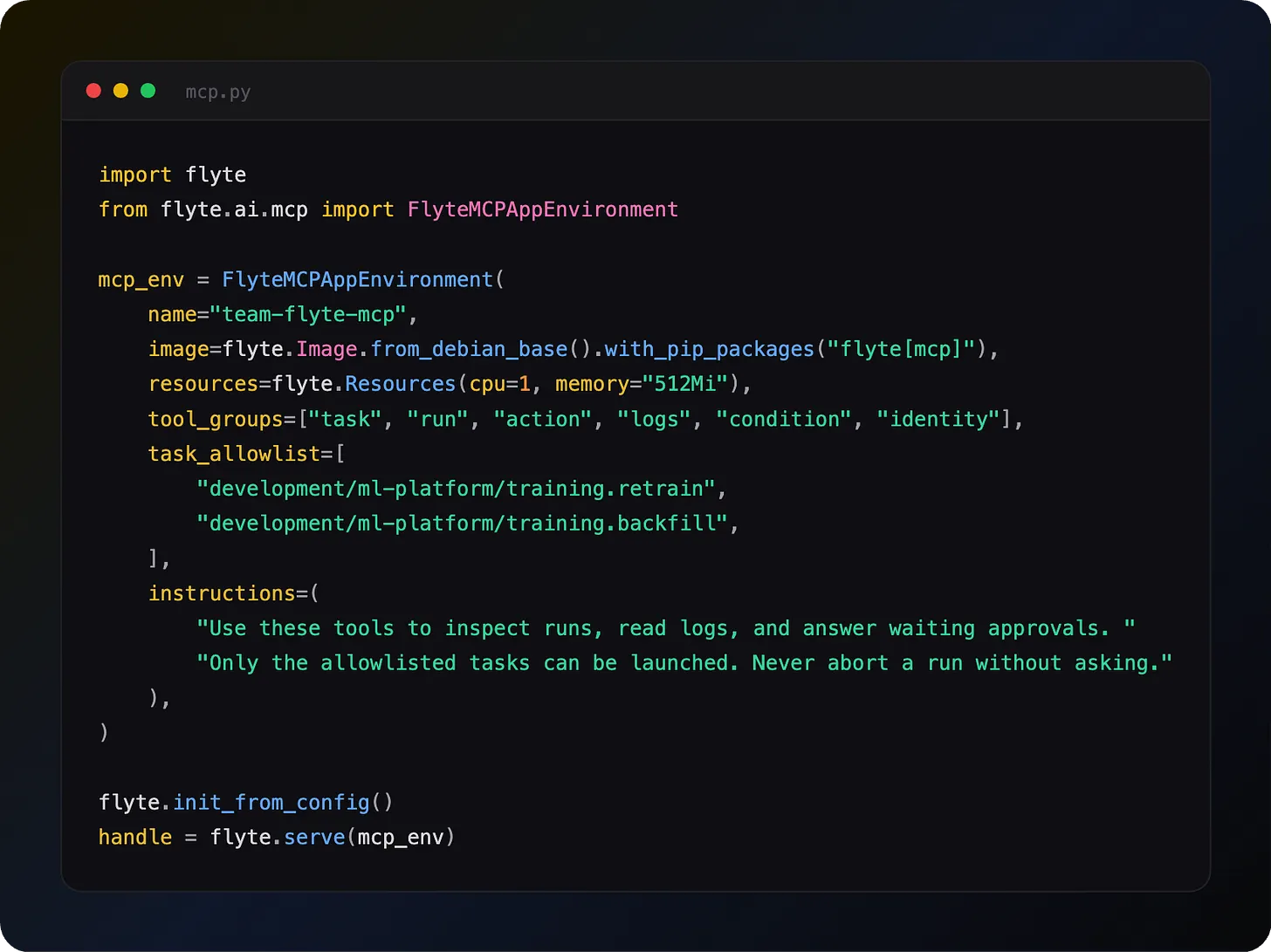
Hard limits are tools the agent can't skip. The approval gate is a tool backed by an external condition, and the run blocks until a person answers:
Above 10 changes, the agent must call it before entering anything. Today's run had 8 changes, so it didn't pause. Prices can only come from the supplier file, and the agent can only reach the systems its tools expose. Credentials belong in the same place: a sign-in tool that types the secret itself, so the model never sees it. (The tutorial keeps the portal password in the instructions for simplicity.)
Every run is checked independently. The run ends with a check through the ERP's own API and audit log, rather than trusting the agent's word that it finished. In this run: 8 prices correct, exactly 8 audit entries, nothing else changed.
Every decision is on the record. A bot's log tells you which click failed. The run graph tells you what the agent saw, what it decided, and why, with a screenshot of every desktop step and a recording of every session. When something goes wrong, you can read the reasoning without rerunning anything. That's more of an audit trail than a bot gives you, not less.
To build your own, start with building an agent on Flyte 2, then traces and reports for the record of every decision, and external conditions for approval gates.
Conclusion
An RPA bot follows a process someone fixed in advance, and that works until it doesn't. Our agent was given a goal and changed its plan as it ran, around a portal redesign, an API refusal and a session timeout that nobody planned for. Its next job is just a new prompt. Stop building bots.