
Connector app
A connector lets you extend Flyte with custom task execution backends — for example, submitting jobs to an internal batch service, a proprietary ML platform, or any external API. Rather than running your task code directly in a container, Flyte delegates execution to the connector, which polls the external system and reports status back to the orchestrator.
Connectors are deployed as long-running services via flyte.app.ConnectorEnvironment, the same app deployment model used for FastAPI endpoints and model servers.
When to build a custom connector
Build a connector when:
- Tasks need to submit work to an external system (e.g., a job scheduler, a cloud ML service) and poll for completion asynchronously
- You want Flyte’s orchestration, observability, and data lineage on top of a non-Kubernetes backend
- Multiple tasks share the same external integration and you want to centralize that logic
Project structure
A connector app spans two concerns: the connector service (deployed once) and the task plugin (used in each workflow). A typical layout is:
my_project/
├── app.py              # Deploy the connector as a flyte app
├── main.py             # Example task that uses the connector
└── my_connector/
    ├── __init__.py
    ├── connector.py    # AsyncConnector implementation
    └── task.py         # Task plugin (AsyncConnectorExecutorMixin)
Step 1: Implement the connector
The connector implements four lifecycle methods: create (submit the job), get (poll status), delete (cancel), and get_logs (stream paginated log lines to the UI).
import time
import uuid
from dataclasses import dataclass
from typing import Any, Dict, Optional

from flyteidl2.connector.connector_pb2 import (
    GetTaskLogsResponse,
    GetTaskLogsResponseBody,
    GetTaskLogsResponseHeader,
)
from flyteidl2.core.execution_pb2 import TaskExecution
from flyteidl2.logs.dataplane.payload_pb2 import LogLine, LogLineOriginator
from google.protobuf.timestamp_pb2 import Timestamp

from flyte import logger
from flyte.connectors import AsyncConnector, ConnectorRegistry, Resource, ResourceMeta


@dataclass
class BatchJobMetadata(ResourceMeta):
    job_id: str
    created_at: float


class BatchJobConnector(AsyncConnector):
    name = "Batch Job Connector"
    task_type_name = "batch_job"
    metadata_type = BatchJobMetadata

    async def create(self, task_template, inputs: Optional[Dict[str, Any]] = None, **kwargs) -> BatchJobMetadata:
        job_id = str(uuid.uuid4())[:8]
        logger.info(f"Submitted batch job {job_id}")
        return BatchJobMetadata(job_id=job_id, created_at=time.time())

    async def get(self, resource_meta: BatchJobMetadata, **kwargs) -> Resource:
        elapsed = time.time() - resource_meta.created_at
        if elapsed < 5:
            return Resource(phase=TaskExecution.RUNNING, message="Job in progress")
        return Resource(
            phase=TaskExecution.SUCCEEDED,
            message="Job completed",
            outputs={"result": f"output-from-{resource_meta.job_id}"},
        )

    async def delete(self, resource_meta: BatchJobMetadata, **kwargs):
        logger.info(f"Cancelled job {resource_meta.job_id}")

    async def get_logs(self, resource_meta: BatchJobMetadata, token: str = "", **kwargs):
        def line(message: str, ts: float) -> LogLine:
            t = Timestamp()
            t.FromSeconds(int(ts))
            return LogLine(timestamp=t, message=message, originator=LogLineOriginator.USER)

        start = resource_meta.created_at
        job_id = resource_meta.job_id
        pages = {
            "": GetTaskLogsResponseBody(lines=[
                line(f"[INFO] Job {job_id} submitted", start),
                line(f"[INFO] Job {job_id} started", start + 1),
            ]),
            "page-2": GetTaskLogsResponseBody(lines=[
                line(f"[INFO] Job {job_id} finished", start + 5),
            ]),
        }
        next_tokens = {"": "page-2", "page-2": ""}
        yield GetTaskLogsResponse(body=pages.get(token, GetTaskLogsResponseBody(lines=[])))
        next_token = next_tokens.get(token, "")
        if next_token:
            yield GetTaskLogsResponse(header=GetTaskLogsResponseHeader(token=next_token))


ConnectorRegistry.register(BatchJobConnector())
Key points:
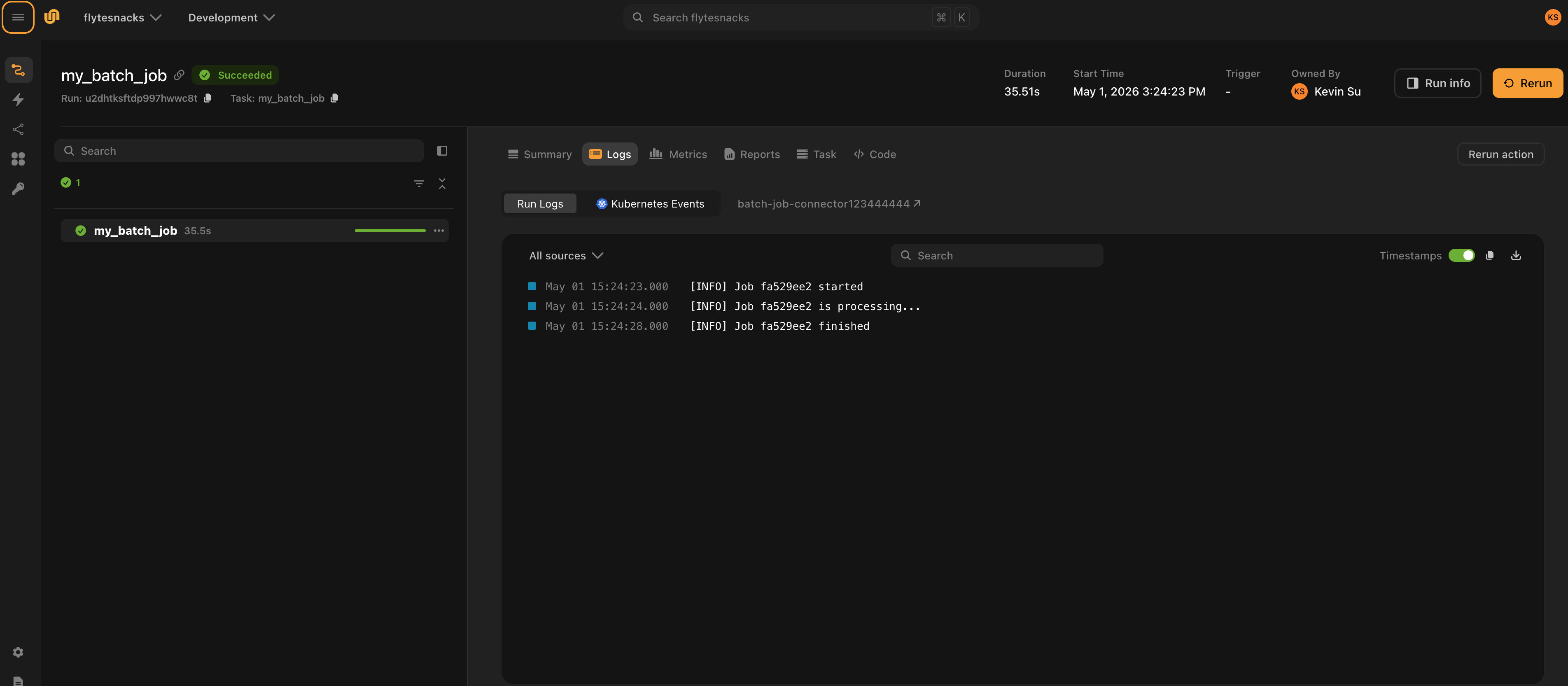
task_type_namemust match the_TASK_TYPEon your task plugin (see Step 2)ResourceMetacarries whatever state you need betweencreateand subsequentget/deletecalls (e.g., a job ID)Resource.outputsmaps output names to values; these become the task’s return valuesget_logsis an async generator that yieldsGetTaskLogsResponsemessages. Yield abodywith log lines, then optionally aheadercarrying the next-page token. Omit the final header to signal end of pagination. The UI displays these lines under the Logs tab of the task run.- Register the connector with
ConnectorRegistry.register()at module level so it is discovered on startup
Connector logs as shown in the UI:
Step 2: Create the task plugin
The task plugin is the Python object your workflows use. It declares the task type, inputs, outputs, and any configuration; AsyncConnectorExecutorMixin wires it to the connector at execution time.
from dataclasses import dataclass
from typing import Any, Dict, Optional, Type

from flyte.connectors import AsyncConnectorExecutorMixin
from flyte.extend import TaskTemplate
from flyte.models import NativeInterface, SerializationContext


@dataclass
class BatchJobConfig:
    timeout_seconds: int = 300


class BatchJobTask(AsyncConnectorExecutorMixin, TaskTemplate):
    _TASK_TYPE = "batch_job"

    def __init__(self, name: str, plugin_config: BatchJobConfig,
                 inputs: Optional[Dict[str, Type]] = None,
                 outputs: Optional[Dict[str, Type]] = None, **kwargs):
        super().__init__(
            name=name,
            interface=NativeInterface(
                {k: (v, None) for k, v in inputs.items()} if inputs else {},
                outputs or {},
            ),
            task_type=self._TASK_TYPE,
            image=None,
            **kwargs,
        )
        self.plugin_config = plugin_config

    def custom_config(self, sctx: SerializationContext) -> Optional[Dict[str, Any]]:
        return {"timeout_seconds": self.plugin_config.timeout_seconds}
Key points:
_TASK_TYPEties this plugin to the connector that declares the sametask_type_namecustom_configserializes plugin-specific settings into the task template; the connector receives these intask_template.customduringcreateimage=Noneis correct — the connector service, not the task container, executes this task
Step 3: Deploy the connector
ConnectorEnvironment builds and deploys the connector as a long-running service. The include parameter lists the Python packages or modules to copy into the connector image.
# app.py
from pathlib import Path

import flyte
import flyte.app

image = flyte.Image.from_debian_base(python_version=(3, 12)).with_pip_packages("flyte[connector]")

connector = flyte.app.ConnectorEnvironment(
    name="batch-job-connector",
    image=image,
    resources=flyte.Resources(cpu="1", memory="1Gi"),
    include=["my_connector"],
)

if __name__ == "__main__":
    flyte.init_from_config(root_dir=Path(__file__).parent)
    d = flyte.deploy(connector)
    print(d[0])
Deploy with:
python app.pyOr using the CLI:
flyte deploy app.py connectorFlyte builds the image, pushes it, and starts the connector service. The service stays running and handles all create / get / delete calls for tasks with task_type_name = "batch_job".
A connector only handles tasks that run in the same project and domain it is deployed to. For example, if you deploy the connector to the flytesnacks project and development domain, it handles only the tasks executing in flytesnacks / development. Tasks of the same task_type_name running in a different project or domain are not routed to it — deploy a separate connector in each project-domain where you need it.
Step 4: Register and run tasks
Create and register a TaskEnvironment that points to your connector, then run the task:
# main.py
from pathlib import Path

from my_connector.task import BatchJobConfig, BatchJobTask

import flyte

batch_job = BatchJobTask(
    name="my_batch_job",
    plugin_config=BatchJobConfig(timeout_seconds=60),
    inputs={"name": str},
    outputs={"result": str},
)

flyte.TaskEnvironment.from_task("batch-job-env", batch_job)

if __name__ == "__main__":
    flyte.init_from_config(root_dir=Path(__file__).parent)
    result = flyte.run(batch_job, name="hello")
    print(result.url)
TaskEnvironment.from_task registers the task under a named environment so Flyte knows which connector service to route executions to.
Run the task:
python main.py
# or
flyte run main.py my_batch_job --name hello
How it all fits together
flyte run main.py my_batch_job
       │
       ▼
  Flyte executor sees task_type = "batch_job"
       │
       ▼
  Routes to the deployed connector service (batch-job-connector)
       │
       ├─ connector.create()  →  submits job, returns BatchJobMetadata
       │
       ├─ connector.get()     →  polls status (RUNNING / SUCCEEDED / FAILED)
       │
       └─ connector.delete()  →  called on cancellation
The connector service is the only component that needs network access to the external system. Your workflow code and Flyte’s propeller never communicate with it directly.
Secrets
There are two ways to pass credentials to a connector.
Connector-level secrets are shared across all tasks using the connector. Add them to ConnectorEnvironment.secrets and read them from os.environ inside the connector. See
Connectors for details.
Per-task secrets (per-user credentials)
When different users need to run the same connector with their own credentials, pass the secret name through the task plugin. Flyte fetches the secret value at execution time and injects it as a keyword argument into the connector’s create and get methods.
1. Accept a secret name in the task plugin:
# my_connector/task.py

class BatchJobTask(AsyncConnectorExecutorMixin, TaskTemplate):
    _TASK_TYPE = "batch_job"

    def __init__(
        self,
        name: str,
        plugin_config: BatchJobConfig,
        inputs: Optional[Dict[str, Type]] = None,
        outputs: Optional[Dict[str, Type]] = None,
        api_key: Optional[str] = None,   # name of the secret in Flyte's secret store
        **kwargs,
    ):
        super().__init__(...)
        self.plugin_config = plugin_config
        self.api_key = api_key

    def custom_config(self, sctx: SerializationContext) -> Optional[Dict[str, Any]]:
        config = {"timeout_seconds": self.plugin_config.timeout_seconds}
        if self.api_key is not None:
            config["secrets"] = {"api_key": self.api_key}  # secret name, not value
        return config
2. Receive the secret value as a kwarg in the connector:
Flyte reads the secret name from task_template.custom.secrets, fetches the value from the secrets store, and passes it as a keyword argument to create and get:
# my_connector/connector.py

class BatchJobConnector(AsyncConnector):
    ...

    async def create(
        self,
        task_template,
        inputs=None,
        api_key: Optional[str] = None,   # value injected by Flyte
        **kwargs,
    ) -> BatchJobMetadata:
        # use api_key to authenticate against the external service
        ...

    async def get(
        self,
        resource_meta: BatchJobMetadata,
        api_key: Optional[str] = None,
        **kwargs,
    ) -> Resource:
        ...
3. Each user specifies their own secret name when defining the task:
# alice's workflow
batch_job = BatchJobTask(
    name="alice_batch_job",
    plugin_config=BatchJobConfig(timeout_seconds=60),
    inputs={"name": str},
    outputs={"result": str},
    api_key="alice-api-key",   # Alice's secret, stored under this name in Flyte
)

# bob's workflow
batch_job = BatchJobTask(
    name="bob_batch_job",
    plugin_config=BatchJobConfig(timeout_seconds=60),
    inputs={"name": str},
    outputs={"result": str},
    api_key="bob-api-key",     # Bob's own secret
)
See Secrets for how to store secrets in Flyte.