
Running locally
Flyte runs locally with no cluster or Docker needed. Install the SDK, write tasks, and run them on your machine. When you’re ready to scale, drop the --local flag and the same code runs on a remote cluster with GPUs.
Getting started
If you haven’t already, install the SDK and configure local persistence as described in the Quickstart.
Running tasks locally
The --local flag tells Flyte to execute a task in your local Python environment rather than on a remote cluster. Add --tui to launch the interactive Terminal UI for real-time monitoring.
# Basic local execution
flyte run --local my_pipeline.py my_task --arg value

# With the interactive TUI
flyte run --local --tui my_pipeline.py my_task --arg value
You can also run tasks programmatically using the Python SDK with flyte.run(). See
Run and deploy tasks for details.
Drop --local to run on a remote cluster when one is configured:
flyte run my_pipeline.py my_task --arg valueTerminal UI
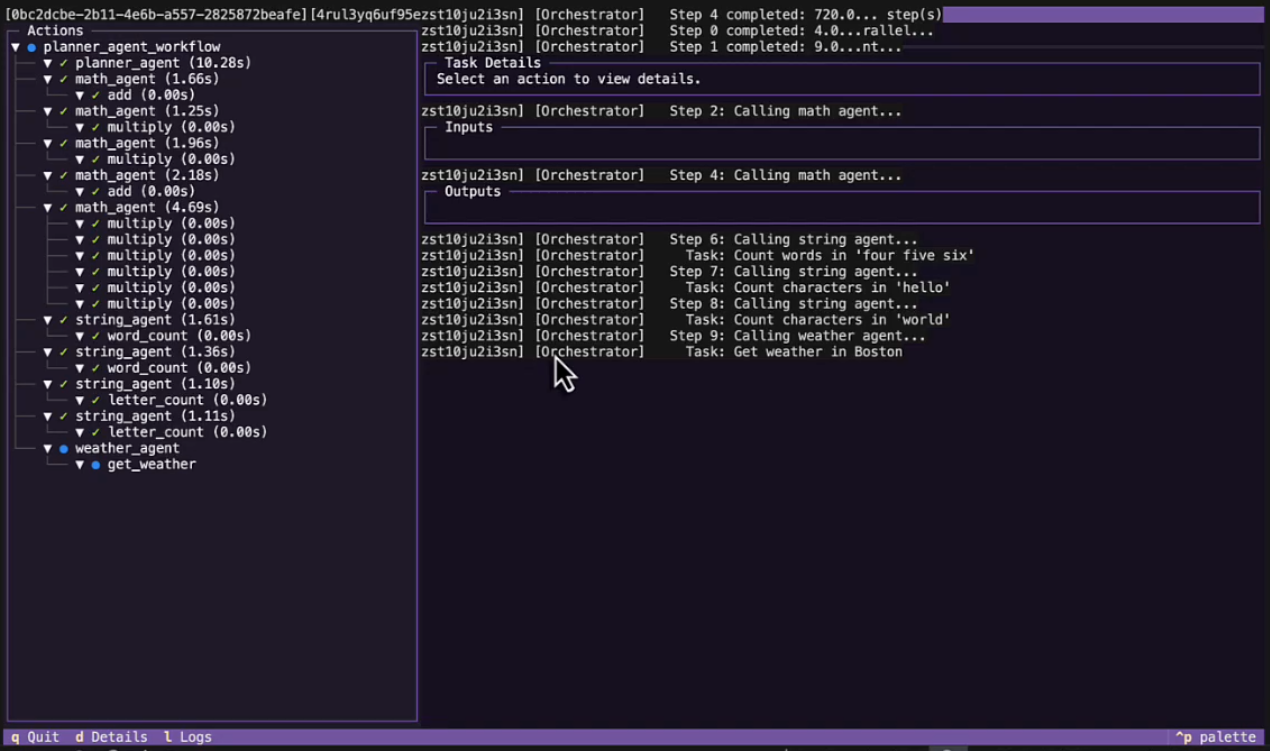
The TUI is an interactive split-screen dashboard. Task tree on the left, details and logs on the right.
flyte run --local --tui my_pipeline.py pipeline --epochs 5
What you see:
- Task tree with live status:
●running,✓done,✗failed - Cache indicators:
$cache hit,~cache enabled but missed - Live logs:
print()output streams in real time - Details panel: inputs, outputs, timing, report paths
- Traced sub-tasks: child nodes for
@flyte.tracedecorated functions
Keyboard shortcuts:
| Key | Action |
|---|---|
q |
Quit |
d |
Details tab |
l |
Logs tab |
Exploring past runs
Flyte persists the inputs and outputs of every task run locally, so you can always go back and inspect what a task received and produced. Launch the TUI on its own to browse past runs, compare inputs and outputs, and review reports:
flyte start tuiWhat works locally
Most Flyte features work in both local and remote execution. The table below summarizes how each feature behaves locally.
| Feature | Local behavior | Details |
|---|---|---|
| Caching | Outputs stored in local SQLite, keyed on task name and inputs. Same inputs = instant results. | Caching |
| Tracing | @flyte.trace functions appear as child nodes in the TUI with their own timing, inputs, and outputs. |
Traces |
| Reports | HTML files saved locally. TUI shows the file path. | Reports |
| Serving | Run apps locally with python serve.py or flyte.with_servecontext(mode="local"). |
Serve and deploy apps |
| Plugins | Same decorators and APIs as remote. Secrets come from environment variables. | Integrations |
| Secrets | Read from .env files or environment variables. No flyte create secret needed. |
Secrets |
Local to remote
The same code runs in both environments. Here’s what changes:
| Aspect | Local | Remote |
|---|---|---|
| Run pipeline | flyte run --local |
flyte run |
| TUI | --tui flag |
Dashboard in Flyte UI |
| Caching | Local SQLite | Cluster-wide distributed cache |
| Reports | Local HTML files | Rendered in the Flyte UI |
| Serving | python serve.py |
flyte deploy serve.py env |
| Secrets | .env / environment variables |
flyte create secret / flyte.Secret |
| Compute | Your CPU/GPU | Resources(cpu=2, memory="4Gi", gpu=1) |
The
TaskEnvironment is the bridge. Locally, image and resource settings are ignored. On the cluster, Flyte builds containers and allocates compute from the same definition.
Next steps
When you’re ready to run on a remote Flyte cluster, see Connecting to a cluster to configure the CLI and SDK.