
Snowflake
The Snowflake connector lets you run SQL queries against Snowflake directly from Flyte tasks. Queries are submitted asynchronously and polled for completion, so they don’t block a worker while waiting for results.
The connector supports:
- Parameterized SQL queries with typed inputs
- Key-pair and password-based authentication
- Returns query results as DataFrames
- Automatic links to the Snowflake query dashboard in the Flyte UI
- Query cancellation on task abort
Installation
pip install flyteplugins-snowflakeThis installs the Snowflake Python connector and the cryptography library for key-pair authentication.
Quick start
Here’s a minimal example that runs a SQL query on Snowflake:
from flyte.io import DataFrame
from flyteplugins.connectors.snowflake import Snowflake, SnowflakeConfig

config = SnowflakeConfig(
    account="myorg-myaccount",
    user="flyte_user",
    database="ANALYTICS",
    schema="PUBLIC",
    warehouse="COMPUTE_WH",
)

count_users = Snowflake(
    name="count_users",
    query_template="SELECT COUNT(*) FROM users",
    plugin_config=config,
    output_dataframe_type=DataFrame,
)
This defines a task called count_users that runs SELECT COUNT(*) FROM users on the configured Snowflake instance. When executed, the connector:
- Connects to Snowflake using the provided configuration
- Submits the query asynchronously
- Polls until the query completes or fails
- Provides a link to the query in the Snowflake dashboard
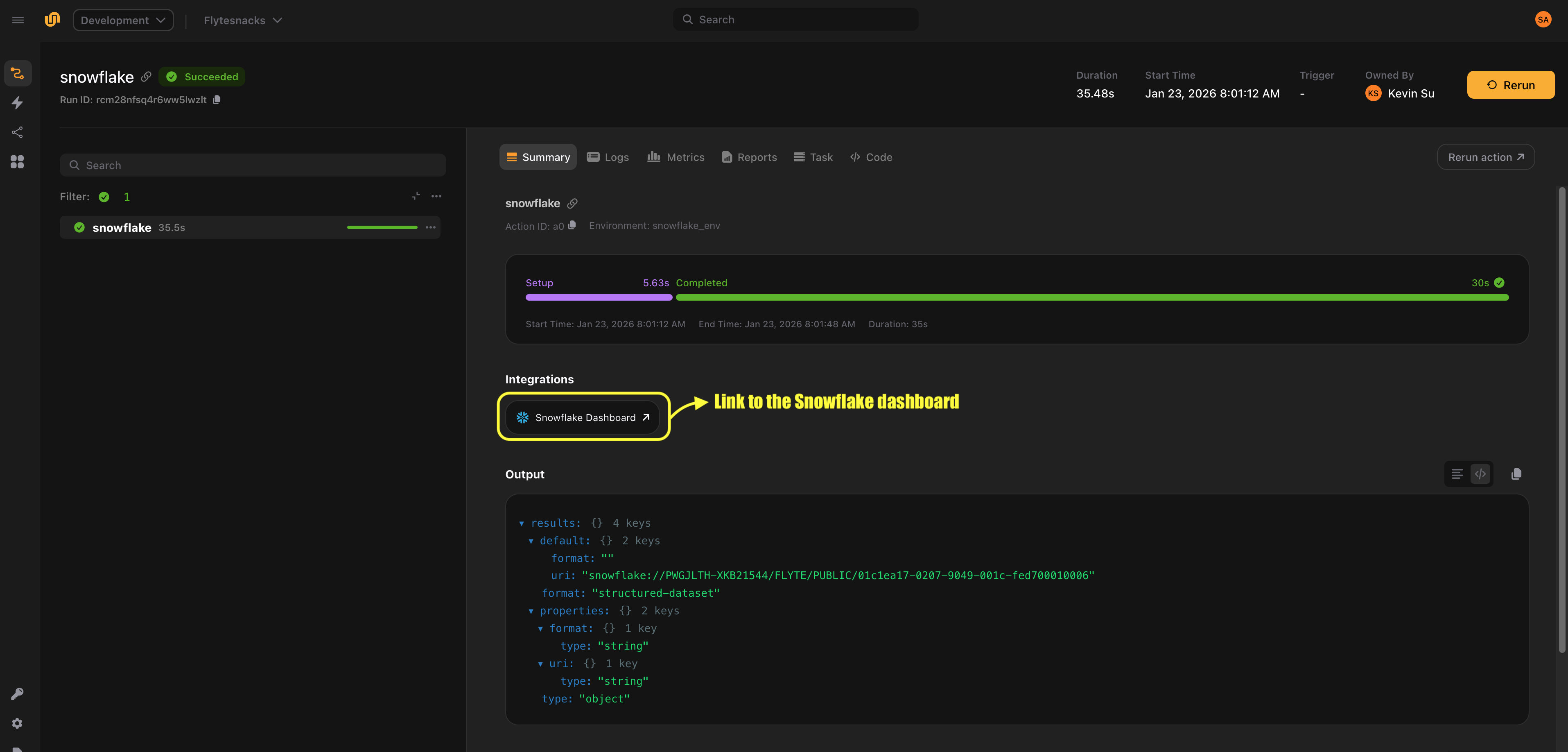
To run the task, create a TaskEnvironment from it and execute it locally or remotely:
import flyte

snowflake_env = flyte.TaskEnvironment.from_task("snowflake_env", count_users)

if __name__ == "__main__":
    flyte.init_from_config()

    # Run locally (connector runs in-process, requires credentials and packages locally)
    run = flyte.with_runcontext(mode="local").run(count_users)

    # Run remotely (connector runs on the control plane)
    run = flyte.with_runcontext(mode="remote").run(count_users)

    print(run.url)
The TaskEnvironment created by from_task does not need an image or pip packages. Snowflake tasks are connector tasks, which means the query executes on the connector service, not in your task container. In local mode, the connector runs in-process and requires flyteplugins-snowflake and credentials to be available on your machine. In remote mode, the connector runs on the control plane.
Configuration
The SnowflakeConfig dataclass defines the connection settings for your Snowflake instance.
Required fields
| Field | Type | Description |
|---|---|---|
account |
str |
Snowflake account identifier (e.g. "myorg-myaccount") |
database |
str |
Target database name |
schema |
str |
Target schema name (e.g. "PUBLIC") |
warehouse |
str |
Compute warehouse to use for query execution |
user |
str |
Snowflake username |
Additional connection parameters
Use connection_kwargs to pass any additional parameters supported by the
Snowflake Python connector. This is a dictionary that gets forwarded directly to snowflake.connector.connect().
Common options include:
| Parameter | Type | Description |
|---|---|---|
role |
str |
Snowflake role to use for the session |
authenticator |
str |
Authentication method (e.g. "snowflake", "externalbrowser", "oauth") |
token |
str |
OAuth token when using authenticator="oauth" |
login_timeout |
int |
Timeout in seconds for the login request |
Example with a role:
config = SnowflakeConfig(
    account="myorg-myaccount",
    user="flyte_user",
    database="ANALYTICS",
    schema="PUBLIC",
    warehouse="COMPUTE_WH",
    connection_kwargs={
        "role": "DATA_ANALYST",
    },
)
Authentication
The connector supports two authentication approaches: key-pair authentication, and password-based or other authentication methods provided through connection_kwargs.
Key-pair authentication
Key-pair authentication is the recommended approach for automated workloads. Pass the names of the Flyte secrets containing the private key and optional passphrase:
query = Snowflake(
    name="secure_query",
    query_template="SELECT * FROM sensitive_data",
    plugin_config=config,
    snowflake_private_key="my-snowflake-private-key",
    snowflake_private_key_passphrase="my-snowflake-pk-passphrase",
)
The snowflake_private_key parameter is the name of the secret (or secret key) that contains your PEM-encoded private key. The snowflake_private_key_passphrase parameter is the name of the secret (or secret key) that contains the passphrase, if your key is encrypted. If your key is not encrypted, omit the passphrase parameter.
The connector decodes the PEM key and converts it to DER format for Snowflake authentication.
If your credentials are stored in a secret group, you can pass secret_group to the Snowflake task. The plugin expects snowflake_private_key and
snowflake_private_key_passphrase to be keys within the same secret group.
Password authentication
Send the password via connection_kwargs:
config = SnowflakeConfig(
    account="myorg-myaccount",
    user="flyte_user",
    database="ANALYTICS",
    schema="PUBLIC",
    warehouse="COMPUTE_WH",
    connection_kwargs={
        "password": "my-password",
    },
)
OAuth authentication
For OAuth-based authentication, specify the authenticator and token:
config = SnowflakeConfig(
    account="myorg-myaccount",
    user="flyte_user",
    database="ANALYTICS",
    schema="PUBLIC",
    warehouse="COMPUTE_WH",
    connection_kwargs={
        "authenticator": "oauth",
        "token": "<oauth-token>",
    },
)
Query templating
Use the inputs parameter to define typed inputs for your query. Input values are bound using the %(param)s syntax supported by the
Snowflake Python connector, which handles type conversion and escaping automatically.
Supported input types
The inputs dictionary maps parameter names to Python values. Supported scalar types include str, int, float, and bool.
To insert multiple rows in a single query, you can also provide lists as input values. When using list inputs, be sure to set batch=True on the Snowflake task. This enables automatic batching, where the inputs are expanded and sent as a single multi-row query instead of you having to write multiple individual statements.
Batched INSERT with list inputs
When batch=True is enabled, a parameterized INSERT query with list inputs is automatically expanded into a multi-row VALUES statement.
Example:
query = "INSERT INTO t (a, b) VALUES (%(a)s, %(b)s)"
inputs = {"a": [1, 2], "b": ["x", "y"]}
This is expanded into:
INSERT INTO t (a, b)
VALUES (%(a_0)s, %(b_0)s), (%(a_1)s, %(b_1)s)
with the following flattened parameters:
flat_params = {
    "a_0": 1,
    "b_0": "x",
    "a_1": 2,
    "b_1": "y",
}
Constraints
- The query must contain exactly one
VALUES (...)clause. - All list inputs must have the same non-zero length.
Parameterized SELECT
from flyte.io import DataFrame

events_by_date = Snowflake(
    name="events_by_date",
    query_template="SELECT * FROM events WHERE event_date = %(event_date)s",
    plugin_config=config,
    inputs={"event_date": str},
    output_dataframe_type=DataFrame,
)
You can call the task with the required inputs:
@env.task
async def fetch_events() -> DataFrame:
    return await events_by_date(event_date="2024-01-15")
Multiple inputs
You can define multiple input parameters of different types:
filtered_events = Snowflake(
    name="filtered_events",
    query_template="""
        SELECT * FROM events
        WHERE event_date >= %(start_date)s
          AND event_date <= %(end_date)s
          AND region = %(region)s
          AND score > %(min_score)s
    """,
    plugin_config=config,
    inputs={
        "start_date": str,
        "end_date": str,
        "region": str,
        "min_score": float,
    },
    output_dataframe_type=DataFrame,
)
The query template is normalized before execution: newlines and tabs are replaced with spaces, and consecutive whitespace is collapsed. You can format your queries across multiple lines for readability without affecting execution.
Retrieving query results
If your query produces output, set output_dataframe_type to capture the results. output_dataframe_type accepts DataFrame from flyte.io. This is a meta-wrapper type that represents tabular results and can be materialized into a concrete DataFrame implementation using open() where you specify the target type and all().
from flyte.io import DataFrame

top_customers = Snowflake(
    name="top_customers",
    query_template="""
        SELECT customer_id, SUM(amount) AS total_spend
        FROM orders
        GROUP BY customer_id
        ORDER BY total_spend DESC
        LIMIT 100
    """,
    plugin_config=config,
    output_dataframe_type=DataFrame,
)
At present, only pandas.DataFrame is supported. The results are returned directly when you call the task:
import pandas as pd

@env.task
async def analyze_top_customers() -> dict:
    df = await top_customers()
    pandas_df = await df.open(pd.DataFrame).all()
    total_spend = pandas_df["total_spend"].sum()
    return {"total_spend": float(total_spend)}
If you specify pandas.DataFrame as the output_dataframe_type, you do not need to call open() and all() to materialize the results.
import pandas as pd

top_customers = Snowflake(
    name="top_customers",
    query_template="""
        SELECT customer_id, SUM(amount) AS total_spend
        FROM orders
        GROUP BY customer_id
        ORDER BY total_spend DESC
        LIMIT 100
    """,
    plugin_config=config,
    output_dataframe_type=pd.DataFrame,
)

@env.task
async def analyze_top_customers() -> dict:
    df = await top_customers()
    total_spend = df["total_spend"].sum()
    return {"total_spend": float(total_spend)}
Be sure to inject the SNOWFLAKE_PRIVATE_KEY and SNOWFLAKE_PRIVATE_KEY_PASSPHRASE environment variables as secrets into your downstream tasks, as they must have access to Snowflake credentials in order to retrieve the DataFrame results. More on how you can create secrets
here.
If you don’t need query results (for example, DDL statements or INSERT queries), omit output_dataframe_type.
End-to-end example
Here’s a complete workflow that uses the Snowflake connector as part of a data pipeline. The workflow creates a staging table, inserts records, queries aggregated results and processes them in a downstream task.
import flyte
from flyte.io import DataFrame
from flyteplugins.connectors.snowflake import Snowflake, SnowflakeConfig

config = SnowflakeConfig(
    account="myorg-myaccount",
    user="flyte_user",
    database="ANALYTICS",
    schema="PUBLIC",
    warehouse="COMPUTE_WH",
    connection_kwargs={
        "role": "ETL_ROLE",
    },
)

# Step 1: Create the staging table if it doesn't exist
create_staging = Snowflake(
    name="create_staging",
    query_template="""
        CREATE TABLE IF NOT EXISTS staging.daily_events (
            event_id STRING,
            event_date DATE,
            user_id STRING,
            event_type STRING,
            payload VARIANT
        )
    """,
    plugin_config=config,
    snowflake_private_key="snowflake",
    snowflake_private_key_passphrase="snowflake_passphrase",
)

# Step 2: Insert a record into the staging table
insert_events = Snowflake(
    name="insert_event",
    query_template="""
        INSERT INTO staging.daily_events (event_id, event_date, user_id, event_type)
        VALUES (%(event_id)s, %(event_date)s, %(user_id)s, %(event_type)s)
    """,
    plugin_config=config,
    inputs={
        "event_id": list[str],
        "event_date": list[str],
        "user_id": list[str],
        "event_type": list[str],
    },
    snowflake_private_key="snowflake",
    snowflake_private_key_passphrase="snowflake_passphrase",
    batch=True,
)

# Step 3: Query aggregated results for a given date
daily_summary = Snowflake(
    name="daily_summary",
    query_template="""
        SELECT
            event_type,
            COUNT(*) AS event_count,
            COUNT(DISTINCT user_id) AS unique_users
        FROM staging.daily_events
        WHERE event_date = %(report_date)s
        GROUP BY event_type
        ORDER BY event_count DESC
    """,
    plugin_config=config,
    inputs={"report_date": str},
    output_dataframe_type=DataFrame,
    snowflake_private_key="snowflake",
    snowflake_private_key_passphrase="snowflake_passphrase",
)

# Create environments for all Snowflake tasks
snowflake_env = flyte.TaskEnvironment.from_task(
    "snowflake_env", create_staging, insert_events, daily_summary
)

# Main pipeline environment that depends on the Snowflake task environments
env = flyte.TaskEnvironment(
    name="analytics_env",
    resources=flyte.Resources(memory="512Mi"),
    image=flyte.Image.from_debian_base(name="analytics").with_pip_packages(
        "flyteplugins-snowflake", pre=True
    ),
    secrets=[
        flyte.Secret(key="snowflake", as_env_var="SNOWFLAKE_PRIVATE_KEY"),
        flyte.Secret(
            key="snowflake_passphrase", as_env_var="SNOWFLAKE_PRIVATE_KEY_PASSPHRASE"
        ),
    ],
    depends_on=[snowflake_env],
)


# Step 4: Process the results in Python
@env.task
async def generate_report(summary: DataFrame) -> dict:
    import pandas as pd

    df = await summary.open(pd.DataFrame).all()
    total_events = df["event_count"].sum()
    top_event = df.iloc[0]["event_type"]
    return {
        "total_events": int(total_events),
        "top_event_type": top_event,
        "event_types_count": len(df),
    }


# Compose the pipeline
@env.task
async def run_daily_pipeline(
    event_ids: list[str],
    event_dates: list[str],
    user_ids: list[str],
    event_types: list[str],
) -> dict:
    await create_staging()
    await insert_events(
        event_id=event_ids,
        event_date=event_dates,
        user_id=user_ids,
        event_type=event_types,
    )
    summary = await daily_summary(report_date=event_dates[0])
    return await generate_report(summary=summary)


if __name__ == "__main__":
    flyte.init_from_config()

    # Run locally
    run = flyte.with_runcontext(mode="local").run(
        run_daily_pipeline,
        event_ids=["event-1", "event-2"],
        event_dates=["2023-01-01", "2023-01-02"],
        user_ids=["user-1", "user-2"],
        event_types=["click", "view"],
    )

    # Or run remotely
    run = flyte.with_runcontext(mode="remote").run(
        run_daily_pipeline,
        event_ids=["event-1", "event-2"],
        event_dates=["2023-01-01", "2023-01-02"],
        user_ids=["user-1", "user-2"],
        event_types=["click", "view"],
    )

    print(run.url)